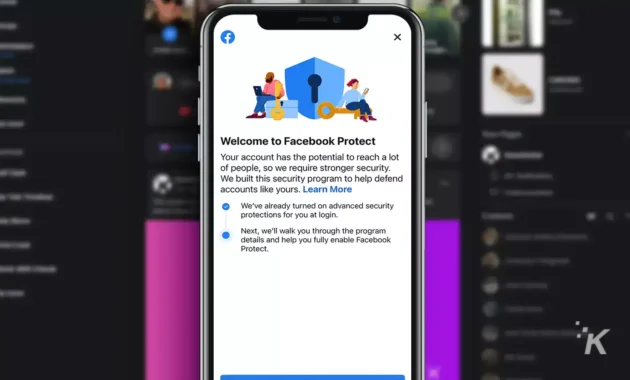
In 2026, online security threats continue to evolve, making account protection more critical than ever. Facebook Protect (also referred to as Advanced Protection in some regions) is Meta’s enhanced security program designed to safeguard high-risk or targeted accounts—such as those of public figures, journalists, activists, politicians, content creators, or anyone with a large following—from hacking, phishing, and unauthorized access.
This feature simplifies and mandates stronger defenses, primarily by enforcing two-factor authentication (2FA), stronger password requirements, and continuous monitoring for suspicious activity. While it’s often mandatory for eligible “high-target” accounts (with deadlines to activate or risk temporary lockout), any user can enable similar protections through Facebook’s security settings.
Activating Facebook Protect in 2026. It includes step-by-step how-tos for mobile and desktop, benefits, eligibility, comparison tables, (where power outages and mobile data limits are common), and FAQs to help you secure your account quickly and confidently.
What Is Facebook Protect and Why Activate It in 2026?
Facebook Protect is not a single toggle—it’s a security bundle that:
- Requires two-factor authentication (via SMS, authenticator app, or security key).
- Enforces complex passwords and flags weak ones.
- Monitors for unusual login attempts and potential breaches.
- Provides priority support for hacked accounts.
- Alerts you to suspicious activity faster.
In 2026, with rising AI-powered phishing and credential-stuffing attacks, activating these protections is essential. For public figures or high-visibility users, Meta often sends notifications with deadlines (e.g., “Turn on within X days or account may be locked”). Regular users benefit too—enabling similar settings prevents most common hacks.
Eligibility: Primarily for accounts Meta flags as high-risk (e.g., politicians, journalists, creators with large followings). If you see a prompt or email about it, activate immediately.
Benefits of Facebook Protect / Advanced Protection
- Extra layer beyond passwords.
- Faster threat detection.
- Easier recovery if hacked.
- Peace of mind for families, businesses, or creators worldwide.
Comparison Table: Facebook Protect vs. Standard Security Features
| Feature | Standard Facebook Account | With Facebook Protect / Advanced Protection | Best For |
|---|---|---|---|
| Two-Factor Authentication | Optional | Mandatory (SMS/app/key) | Preventing unauthorized logins |
| Password Strength Enforcement | Recommended | Strictly enforced | Blocking weak/reused passwords |
| Login Monitoring & Alerts | Basic | Advanced, priority alerts | Quick response to threats |
| Account Recovery Priority | Standard | Faster support | High-profile or business users |
| Mandatory Activation | No | Yes for eligible accounts | Public figures, journalists |
| Availability | All users | Targeted + opt-in similar settings | Everyone concerned about security |
This table shows why activating Protect (or equivalent) significantly boosts safety.
How-To: Activate Facebook Protect Step-by-Step (Mobile App – Android/iOS)
Most users receive a notification or see it in settings. Follow these steps:
- Open the Facebook App – Ensure it’s updated (check Play Store/App Store for version 2026 releases).
- Access Settings:
- Tap the Menu icon (three lines) in the top-right (Android) or bottom-right (iOS).
- Go to Settings & Privacy → Settings.
- Find Facebook Protect / Advanced Protection:
- Scroll to Accounts Center > Password and security (or search “Protect” in settings).
- Look for Facebook Protect, Advanced Protection, or a direct “Get Started” banner.
- Start Activation:
- Tap Get Started or Turn On.
- Read the welcome screen → tap Next.
- Review Benefits → tap Next again.
- Complete Security Checks:
- Facebook scans for issues (e.g., no 2FA).
- If prompted, tap Fix Now for each item.
- Enable Two-Factor Authentication (key requirement):
- Choose method: Authentication app (recommended – Google Authenticator, Authy, etc.), SMS, or Security key.
- Follow prompts: Scan QR code or enter phone number.
- Verify with code.
- Finish Setup → Tap Confirm or Done.
- Confirmation – You’ll see a success screen; account is now protected.
Tip for Bihar/low-data users: Do this over Wi-Fi; the process uses minimal data and works offline after initial setup.
How-To: Activate on Desktop (Facebook.com)
- Log in to facebook.com.
- Click your profile picture (top-right) → Settings & Privacy → Settings.
- In left menu, go to Accounts Center → Password and security.
- Look for Facebook Protect or Advanced Protection.
- Click Get Started or Turn On.
- Follow on-screen prompts: Welcome → Benefits → Security fixes → Enable 2FA.
- Choose 2FA method → Verify → Complete.
If no direct option appears, go to Security Checkup in settings and enable 2FA manually.
Tips for Maximum Security After Activating Facebook Protect
- Use an authenticator app over SMS (more secure against SIM-swapping).
- Set a strong, unique password (use a manager like Bitwarden).
- Regularly review Where You’re Logged In (Settings > Security > Where You’re Logged In) and log out unknown devices.
- Enable Login Alerts for new devices/locations.
- For creators/public figures: Lock your profile (Settings > Privacy > Profile Locking) for extra control.
- Backup recovery codes from 2FA setup.
- In outage-prone areas: Use offline authenticator apps.
FAQs: Activating Facebook Protect in 2026
1. Who needs to activate Facebook Protect?
Primarily high-target accounts (public figures, journalists, politicians, large creators). Meta notifies eligible users with deadlines.
2. What happens if I don’t activate it?
Eligible accounts may face temporary lockout until enabled. Regular users won’t be forced but miss extra protection.
3. Is two-factor authentication required?
Yes—it’s the core of Facebook Protect. Use an app for best security.
4. Can regular users enable similar protection?
Yes—go to Settings > Password and security > Two-factor authentication and turn it on manually.
5. Does Facebook Protect cost money?
No—it’s free for eligible accounts.
6. What if I can’t find the option?
Search “Protect” in settings, check notifications, or visit facebook.com/security. Update app/browser.
7. Is it safe in India/Bihar?
Yes—works globally. Use Wi-Fi for setup; authenticator apps work offline.
