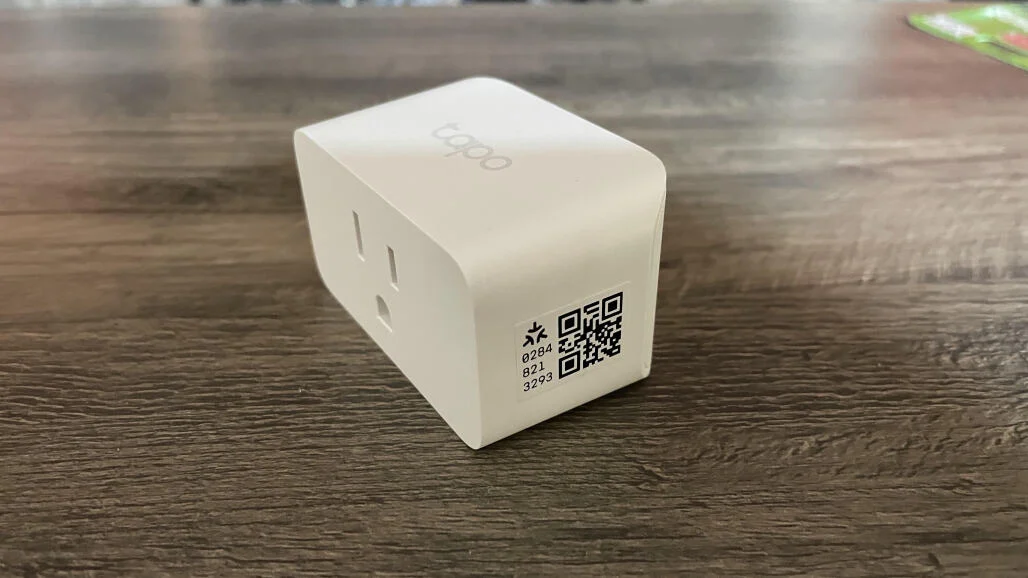
TP-Link Tapo P110M stands out as one of the best budget-friendly options worldwide, combining Matter compatibility, real-time energy monitoring, away mode, scheduling, voice control (Alexa, Google Home, Siri), and an ultra-low price tag (often $12–$18 per unit).
Tapo P110M: key features, real-world performance, setup guide, pros/cons, pricing, comparison tables, how-tos for essential functions, tips for global users.
Key Features of the TP-Link Tapo P110M
- Matter certified — works natively with Apple Home, Google Home, Amazon Alexa, Samsung SmartThings, and more without a hub.
- Real-time & historical energy monitoring — track kWh usage, daily/monthly cost estimates in the Tapo app.
- Remote on/off + scheduling — timers, sunrise/sunset, countdowns, away mode randomization.
- Voice control — “Alexa, turn on the fan”, “Hey Google, turn off the lamp”.
- Overload & surge protection — 15A/1800W max load, built-in safety cut-off.
- Compact design — fits two plugs in a standard outlet.
- No subscription — all features free forever.
- LED indicator — customizable brightness or off.
- Offline reliability — schedules and countdowns run locally even if Wi-Fi drops.
TP-Link Tapo P110M Specs Table (2026)
| Specification | Details |
|---|---|
| Protocol | Wi-Fi 2.4 GHz + Matter (Thread-ready via hub) |
| Max Load | 15A / 1800W (resistive) |
| Energy Monitoring | Real-time + historical (kWh, cost estimate) |
| Voice Assistants | Alexa, Google Home, Siri (HomeKit via Matter) |
| Scheduling | Timers, sunrise/sunset, recurring, away mode |
| Physical Button | Yes (manual on/off) |
| LED Ring | On/Off toggleable |
| Dimensions | Compact (fits two in standard outlet) |
| Price (2026 street) | $12–$18 (single), $25–$35 (2-pack) |
| Warranty | 2 years |
Real-World Performance & User Experience
The Tapo P110M shines in everyday scenarios:
- Energy Savings — Users report 10–30% reduction on high-draw appliances (fans, heaters, chargers) by scheduling and monitoring.
- Matter Integration — Seamless with Apple Home, Google Home, Alexa routines—control via any ecosystem.
- Reliability — Local schedules survive Wi-Fi outages; Matter adds future-proofing.
- App Experience — Tapo app is clean, fast, supports groups, scenes, automation.
- Build Quality — Sturdy plug, good heat dissipation, no buzzing.
Limitations:
- No Thread radio (Matter over Wi-Fi only; needs hub for Thread).
- Energy monitoring accuracy ~±5–10% (good enough for most).
- No power-strip version yet (single socket only).
PCMag calls it “the best budget smart plug with energy monitoring”; CNET praises Matter support and app simplicity.
TP-Link Tapo P110M vs. Competitors (2026)
| Feature | Tapo P110M | Kasa HS110 | Meross MSS310 | Wipro Smart Plug | Winner |
|---|---|---|---|---|---|
| Price (single) | $12–$18 | $18–$25 | $15–$20 | $10–$15 | Tapo |
| Matter Support | Yes | No | Yes | No | Tie (Tapo/Meross) |
| Energy Monitoring | Yes (real-time) | Yes | Yes | Basic | Tapo |
| Local Schedules | Yes | Yes | Yes | Limited | Tapo |
| Voice Control | Alexa/Google/Siri | Alexa/Google | Alexa/Google/Siri | Alexa/Google | Tapo/Meross |
| App Quality | Excellent | Good | Good | Average | Tapo |
| Best For | Budget + Matter | Kasa ecosystem | HomeKit focus | Ultra-cheap | Tapo (value) |
Tapo P110M wins on price-to-feature ratio and Matter readiness.
How-To: Set Up & Use the Tapo P110M (Step-by-Step)
1. Initial Setup
- Plug the Tapo P110M into a wall outlet.
- Download Tapo app (iOS/Android) → sign in or create TP-Link account.
- Tap + → Add Device → Plugs → Tapo P110M.
- Press and hold the power button until LED blinks amber + green.
- Connect to 2.4 GHz Wi-Fi (not 5 GHz) → follow prompts.
- Name device (e.g., “Bedroom Fan”) → assign room.
2. Enable Energy Monitoring
- Open device card in Tapo app.
- Tap Energy tab → view real-time power (W), daily/monthly usage (kWh).
- Set electricity rate (Settings → Energy → Rate) for cost estimates.
3. Create Schedules & Timers
- Device page → Schedule tab → + → New Schedule.
- Choose On/Off, time, repeat days, sunrise/sunset.
- For countdown: Timer tab → set duration → Start.
4. Add to Google Home / Alexa / Apple Home (Matter)
Google Home:
- Google Home app → + → Set up device → Matter-enabled device.
- Scan QR code on plug (or in Tapo app → Share → Matter QR).
Alexa:
- Alexa app → Devices → + → Add Device → Other → Matter device → scan QR.
Apple Home (Matter):
- Home app → + → Add Accessory → scan QR code.
Tip for Bihar users: Schedules run locally—no internet needed after setup; ideal for power cuts.
Tips for Tapo P110M in 2026
- Group plugs (e.g., “All Lights”) for one-tap control.
- Use away mode randomization for security.
- Monitor high-draw devices (AC, geyser) to save electricity.
- For low-data areas: App setup uses ~20–30 MB; schedules offline.
- Update firmware via Tapo app for new Matter features.
FAQs: TP-Link Tapo P110M Smart Plug 2026
1. Is the Tapo P110M worth buying in 2026?
Yes—one of the best budget smart plugs with Matter, energy monitoring, and reliable app.
2. Does it work with Apple HomeKit?
Yes—via Matter (scan QR code); no hub required.
3. How accurate is energy monitoring?
±5–10%—good for tracking trends and estimating bills.
4. Do schedules work offline?
Yes—once set, timers and countdowns run locally.
5. Can I use it with Alexa, Google, and Siri at the same time?
Yes—add to multiple ecosystems via Matter.
6. Any subscription fees?
None—all features free forever.
7. Biggest downsides?
No Thread radio (Matter over Wi-Fi only); single socket design.
