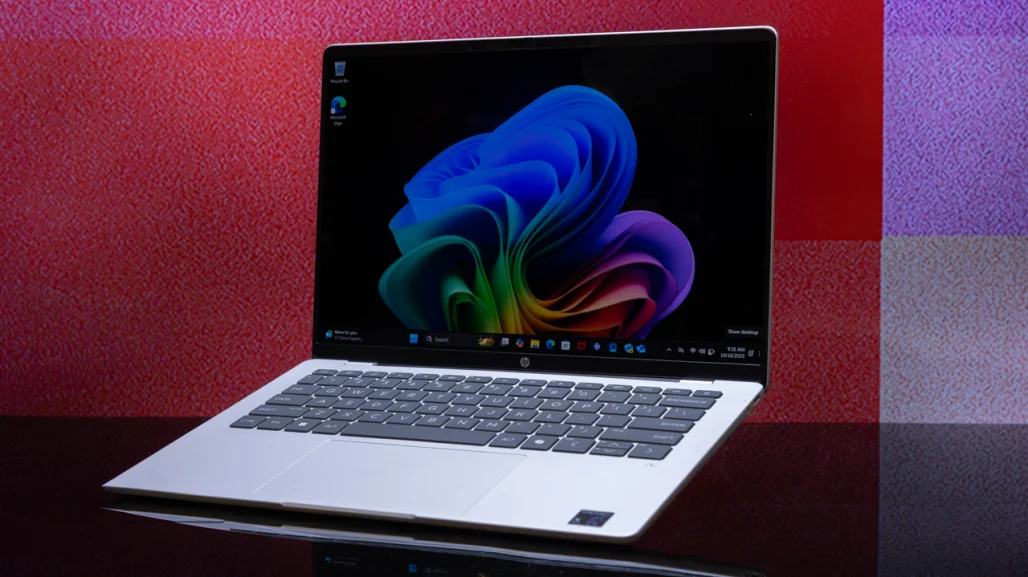
HP OmniBook 5 14 (often called OmniBook 5 Snapdragon) stands out as a midrange ultraportable that prioritizes extreme battery life and a stunning OLED display over raw power. Starting around $800–$900 (frequently discounted), it offers up to 34 hours of real-world endurance in testing—longer than almost any traditional Intel or AMD laptop—along with a beautiful 14-inch OLED touchscreen, lightweight metal design, and solid productivity performance.
OmniBook 5 14’s key specs, real-world battery and display performance, setup, pros/cons, pricing, comparison tables, step-by-step how-tos, tips for worldwide users (including low-power or mobile scenarios in places like Patna, Bihar), and FAQs. Drawing from 2026 reviews (PCMag Editors’ Choice, CNET 8.5/10, Verge praise for cheap OLED, TweakTown 75%), it’s a compelling choice for students, remote workers, commuters, and anyone who values all-day unplugged use.
HP OmniBook 5 14 Key Specs & Design
The OmniBook 5 14 uses Qualcomm’s Snapdragon X Plus (X1P-42-100) processor—8 cores, up to 3.4 GHz, with a 45 TOPS NPU for AI tasks. Paired with 16GB or 32GB LPDDR5X RAM and 512GB/1TB SSD, it delivers snappy everyday performance for web browsing, Office, streaming, and light multitasking.
The 14-inch OLED touchscreen (1920×1200, 60Hz) is a highlight—vibrant colors, deep blacks, and excellent contrast make movies and photos pop. The slim aluminum chassis (around 2.85 lbs / 1.29 kg, 0.51–0.55 inches thick) feels premium for the price, with a comfortable keyboard, large touchpad, and decent port selection (2× USB-C 10Gbps, 1× USB-A, audio jack).
HP OmniBook 5 14 Specs Table (2026)
| Specification | Details |
|---|---|
| Processor | Qualcomm Snapdragon X Plus X1P-42-100 (8-core) |
| GPU | Qualcomm Adreno X1-45 (integrated) |
| NPU | 45 TOPS |
| RAM | 16GB or 32GB LPDDR5X-8448 |
| Storage | 512GB / 1TB SSD |
| Display | 14-inch 1920×1200 OLED touchscreen, 60Hz |
| Battery Life (tested) | 28–34+ hours (varies by workload) |
| Battery Capacity | 59Wh |
| Weight | 2.85 lbs (1.29 kg) |
| Ports | 2× USB-C 10Gbps, 1× USB-A 10Gbps, audio jack |
| Connectivity | Wi-Fi 6E, Bluetooth 5.3 |
| Price (2026 street) | $799–$999 (often $850–$900 as tested) |
HP OmniBook 5 14 Battery Life: A True Marathon Runner
The Snapdragon X Plus chip and efficient OLED deliver record-breaking endurance. PCMag clocked 34 hours 48 minutes in video playback tests; CNET hit 28 hours 19 minutes in YouTube streaming; other reviews report 20–30+ hours for mixed productivity.
This beats most Intel/AMD ultraportables by a wide margin—perfect for full-day use without a charger. Fast Charge hits 50% in 30 minutes. For rural India or frequent outages, the long runtime is a game-changer.
HP OmniBook 5 14 Display & Design Highlights
The OLED panel offers rich colors, true blacks, and high contrast—excellent for streaming, photo editing, or movies. At 1920×1200 (2K), it’s sharp for a 14-inch screen, though 60Hz refresh feels dated compared to 120Hz rivals. Brightness tops ~300–400 nits—fine indoors, average outdoors.
Build is sturdy aluminum with slim bezels, good keyboard (snappy, comfortable), and large touchpad. It’s quiet and cool under load thanks to ARM efficiency.
HP OmniBook 5 14 Performance & Everyday Use
Snapdragon X Plus handles Office, browsing, Zoom, streaming, and light creative work smoothly. AI features (Copilot+, NPU acceleration) run fast. Some x86 apps need emulation (minor performance hit), but most modern software works natively in 2026.
Gaming is light—casual titles run fine, but not for AAA.
How-To: Set Up & Optimize the HP OmniBook 5 14
1. Initial Setup
- Power on → follow Windows 11 setup (Microsoft account login).
- Update Windows & drivers via Settings > Windows Update.
- Install HP apps (HP Smart, MyHP) from Microsoft Store for extras.
2. Maximize Battery Life
- Settings → System → Power & battery → Power mode → Best power efficiency.
- Enable Adaptive brightness and Battery Saver.
- Use dark mode (OLED saves power).
- Disable background apps in Settings → Apps → Startup.
3. Connect Peripherals & Displays
- Use USB-C ports for charging/display output.
- Connect external monitor via USB-C → HDMI adapter if needed.
- Pair Bluetooth accessories (mouse, headphones).
Tip for Bihar users: Download offline content (Netflix, YouTube Premium) for power-cut scenarios; battery lasts through long outages.
Pros & Cons Table
| Pros | Cons |
|---|---|
| Class-leading battery life (28–34+ hours) | 60Hz refresh rate feels dated |
| Gorgeous OLED display | Colors may need calibration |
| Thin, lightweight premium build | Some x86 apps run slower via emulation |
| Affordable for specs | No dedicated GPU for heavy gaming |
| Good keyboard & touchpad | Brightness average outdoors |
Tips for HP OmniBook 5 14 in 2026
- Use power efficiency mode for maximum runtime.
- Enable dark mode to save OLED power.
- Update BIOS/firmware via HP Support Assistant.
- For rural/low-power areas: Charge via USB-C power bank during outages.
- Pair with external SSD for extra storage.
FAQs: HP OmniBook 5 14 (Snapdragon) 2026
1. How long does the battery really last?
Tested 28–34+ hours depending on workload—video playback hits highest; mixed use 20–28 hours.
2. Is the OLED display good?
Yes—vibrant colors, deep blacks, great for media; 60Hz refresh is smooth but not gaming-focused.
3. Does Snapdragon cause compatibility issues?
Some older x86 apps run via emulation (minor slowdown); most 2026 software is native or fine.
4. Is it good for students or remote work?
Excellent—long battery, portable, perfect for Office, browsing, Zoom.
5. How does it compare to MacBook Air?
Similar battery and portability; Windows ecosystem, cheaper OLED option.
6. Any major downsides?
60Hz screen, average outdoor brightness, no dedicated GPU.
7. Best price in 2026?
$799–$999; check Amazon, HP.com, Flipkart (India) for deals.
- Display9
- Battery8
- Camera Quality8
- Performance9
- Value for Money8
