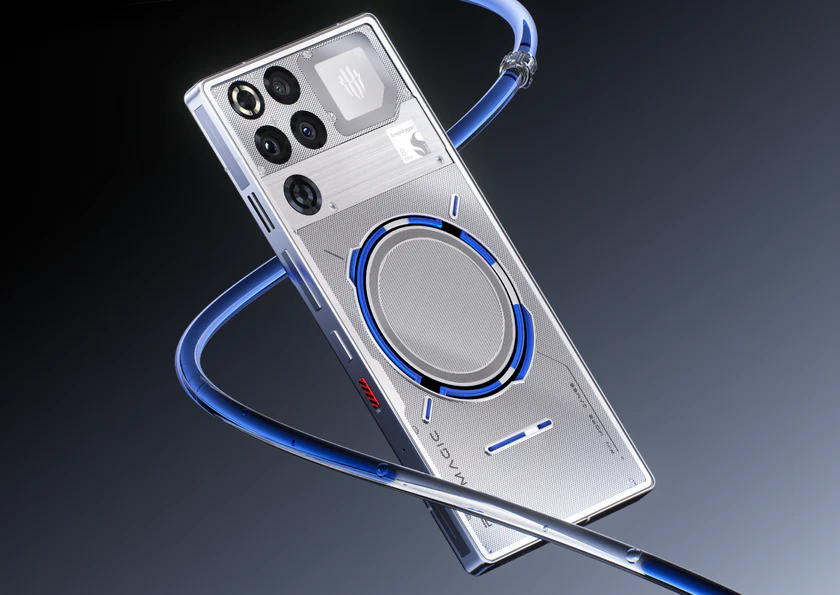
RedMagic 11 Pro revolutionizes mobile gaming with its groundbreaking liquid cooling system, delivering unmatched performance without thermal throttling. This review explores its specs, benchmarks, and real-world gaming prowess for gamers worldwide.
RedMagic 11 Pro: Key Specifications
The RedMagic 11 Pro packs Qualcomm’s Snapdragon 8 Elite Gen 5 processor, enabling PC-level frame rates in demanding titles. It features a 6.85-inch AMOLED display with 144Hz refresh rate and 2000 nits peak brightness for vivid visuals.
Its standout AquaCore liquid cooling combines a piezoelectric micropump circulating non-conductive coolant through ultra-fine channels, paired with a 24,000 RPM fan and massive vapor chamber. This dual air-liquid system maintains temperatures under 40°C during extended sessions, far surpassing traditional cooling.
A 7,500mAh battery supports over 8 hours of high-frame gaming, with 80W fast charging refilling in 35 minutes. IP68 water resistance and a transparent cyberpunk design add premium appeal.
Liquid Cooling Innovation
Liquid cooling pushes the RedMagic 11 Pro to new extremes by evenly distributing heat from the chipset across the device. The fluorinated coolant, stable from -60°C to 108°C, uses a mini ceramic pump at just 80mW power draw—no risk of leaks or shorts.
In benchmarks, it hits 3DMark Wild Life Extreme scores of 8,157 with 84.8% stability, throttling minimally even after 30 minutes. Games like Genshin Impact run at 60FPS ultra settings indefinitely, while Call of Duty Mobile stays at 120FPS without frame drops.
This outperforms rivals; competitors hit 60-70% stability under similar loads due to inferior heat pipes.
Gaming Performance Breakdown
Benchmarks confirm elite sustained power. The Snapdragon 8 Elite crushes AnTuTu at over 3 million points, with Geekbench 6 single/multi-core scores of 3,200/10,000+. Gaming triggers and shoulder buttons offer 520Hz touch sampling for precise control.
Real-world tests show NFS No Limits at max settings with zero stutters, thanks to 24GB LPDDR5X RAM. Haptics deliver immersive feedback, and dual stereo speakers provide spatial audio.
| Game | Max Settings FPS (Avg) | Temperature After 1 Hour |
|---|---|---|
| Genshin Impact | 60 | 38°C |
| COD Mobile | 120 | 39°C |
| PUBG Mobile | 90 | 37°C |
| Asphalt 9 | 120 | 40°C |
RedMagic OS 11’s Game Space mode includes FPS overlays, macro recording, and fan controls for customization.
Design and Build Quality
The flat transparent back reveals flowing white coolant during sessions, creating a mesmerizing cyber aesthetic. At 235g, it’s ergonomic with RGB lighting and an under-display selfie camera to maximize screen real estate.
Build includes aviation-grade aluminum and IPX8 waterproofing, surviving 1.5m submersion. Available in Shadow, Frost, and Deuterium Transparent finishes.
Camera and Daily Use
Cameras punch above gaming phone norms: 50MP main (OIS), 50MP ultrawide, 2MP macro, and 16MP front. Portraits rival flagships with natural bokeh; 4K60 video stays sharp.
For non-gamers, it handles multitasking seamlessly with zero bloatware. Biometrics via ultrasonic fingerprint are lightning-fast.
| Camera Mode | Strengths | Weaknesses |
|---|---|---|
| Daylight | Vibrant, detailed | Slight oversharpening |
| Portrait | Accurate edge detection | Low-light noise |
| Video | Stable 4K | No 8K |
Battery and Charging
The 7,500mAh cell lasts 10+ hours mixed use, with gaming at 20W draw under load. 80W wired hits 100% in 35 minutes; 50W wireless is bonus-fast.
Bypass charging protects the battery during plugged-in gaming.
Pros and Cons
Pros:
- Unrivaled cooling for sustained 60+FPS gaming.
- Flagship power at mid-range $699 price.
- Massive battery and fast charging.
Cons:
- Camera lags true flagships in low light.
- Software needs polish (occasional bugs).
- Niche gaming focus may overwhelm casuals.
How-To: Optimize RedMagic 11 Pro for Peak Gaming
Follow these steps for maximum performance.
- Enable Game Space: Swipe the top-right trigger to launch. Toggle 144Hz, high performance mode, and max fan speed.
- Customize Controls: Map shoulder triggers for jumps/shoots. Set 520Hz touch in settings.
- Activate Liquid Cooling: In Game Space > Cooling, select “AquaCore Pro” for auto-pump during loads.
- Benchmark Tune: Run 3DMark first to calibrate; enable “Beast Mode” for 25% power boost.
- Battery Tips: Use bypass charging; lower brightness to 50% for 10-hour sessions.
- Update OS: Install latest RedMagic OS 11 patches for stability.
Pro Tip: Pair with a cooling grip accessory for marathon LAN parties.
Comparison with Rivals
RedMagic dominates value and endurance.
Is RedMagic 11 Pro Worth Buying?
At $699 for 12/256GB (up to $999 for 24/1TB), it’s a steal for serious gamers. Ideal for esports pros or COD marathons, but casual users might prefer Pixel 10 for cameras.
FAQs
What makes RedMagic 11 Pro’s cooling unique?
It uses the first mass-produced liquid-air dual system with flowing coolant and 24,000 RPM fan, preventing throttling in any game.
How long does the battery last gaming?
Up to 8 hours at max settings; full charge in 35 minutes.
Is it good for non-gaming tasks?
Yes, smooth daily driver with solid cameras and multitasking.
Does liquid cooling make noise?
Fan is audible at max but tuned low; pump is silent.
Global availability?
Ships worldwide via Nubia store; check regional bands.
Software updates?
3 years OS + 4 years security promised.
This beast redefines mobile gaming extremes—grab it if heat kills your fun.
- Display10
- Battery9
- Camera Quality9
- Performance9
- Value for Money10
