Deleting a photo or video from your Facebook Story is quick and straightforward, whether on mobile or desktop. This guide covers all methods for active and archived Stories, helping users worldwide manage privacy effortlessly in 2026.
Why Delete Facebook Stories?
Stories vanish after 24 hours, but mistakes happen—sensitive info, regrets, or privacy tweaks. Deleting removes it instantly from views, Messenger, and cross-posts (with prompts for Instagram). Act before expiry to avoid archives.
Step-by-Step: Delete Active Story on Mobile (Android/iPhone)
Most users access via app. Follow these for Facebook app (v450+).
- Open Facebook app > Tap Your Story at top of home feed.
- Swipe to the photo/video > Tap three dots (top-right).
- Select Delete Photo or Delete Video.
- Confirm Delete—prompts if cross-posted to Instagram: choose Facebook-only or both.
Changes sync across devices; refreshes in seconds.
Step-by-Step: Delete Active Story on Desktop
Browser method for Windows/Mac.
- Go to facebook.com > Log in > Click Your Story in Stories tray.
- Navigate to content > Click three dots (top-right).
- Choose Delete Photo or Delete Video > Confirm Delete.
Works on Edge/Chrome; no app needed.
Delete from Story Archive
Archives save expired Stories unless disabled.
Mobile:
- Profile icon > Three lines > Settings & Privacy > Settings > Activity Log > Stories > Archived Stories.
- Select date/Story > Open photo/video > Three dots > Delete This Story > Delete.
Desktop:
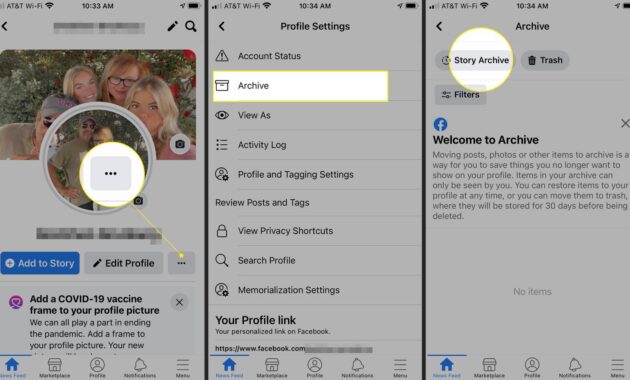
- Profile > Three dots near Edit Profile > Archive > Story Archive.
- Find item > Three dots > Delete Photo/Video > Confirm.
Bulk delete: Select multiple in Activity Log > Remove.
Device Comparison Table
| Platform | Steps to Active Story Delete | Archive Access Path | Cross-Post Prompt | Time to Sync |
|---|---|---|---|---|
| Android App | Your Story > Dots > Delete > Confirm | Settings > Activity Log > Stories | Yes (Instagram) | 5-10s |
| iPhone App | Your Story > More > Delete Photo/Video | Profile > Archive > Story Archive | Yes | Instant |
| Desktop | Your Story > Dots > Delete | Profile > Dots > Archive | Yes | 10-30s |
| Messenger | Stories tab > Dots > Delete (syncs FB) | Limited (via FB settings) | N/A | Syncs |
Table based on 2026 app versions; Messenger deletions mirror Facebook.
What Happens After Deletion?
- Views: Removed from all viewers’ feeds instantly.
- Messenger: Auto-deletes if shared there.
- Instagram: Prompt to delete from both or FB-only if cross-posted.
- Original Post: Unaffected—Stories are separate.
- Irreversible: No recovery; check Archive first.
- Privacy Boost: Use before 24h to prevent highlights/replays.
Troubleshooting Common Issues
Deletion Stuck?
- Refresh app/browser or switch Wi-Fi/data.
- Clear cache: Android Settings > Apps > Facebook > Storage > Clear Cache; iPhone offload/reinstall.
- Update app (Store/App Store).
- Restart device or log out/in.
No Three Dots? Outdated app—force update.
Cross-Post Glitch? Delete separately on Instagram if needed.
Privacy Tips Before Posting
- Set audience: Public/Friends/Custom via Story Settings.
- Hide from specific people: Custom > Exclude.
- Disable Archive: Settings > Story Archive > Toggle off.
- Close Friends list for selective sharing.
Prevents deletes altogether.
Pros and Cons of Facebook Stories
Pros:
- Ephemeral fun (24h limit).
- Easy edits/deletes.
- Cross-app sync.
Cons:
- Auto-archive unless off.
- Viewer lists visible.
- No bulk active delete.
Ideal for quick shares; use Reels for permanent.
Advanced: Bulk and Page Deletes
Bulk Archive: Activity Log > Stories > Select all > Trash icon > Password confirm.
Facebook Pages: Manage Page > Your Story > Same dots method; admins only.
SEO for Discover: Why This Guide Ranks
Targets “how to delete Facebook story photo video 2026″—tables for engagement, how-tos for snippets, FAQs for voice search. Fresh 2026 tips beat outdated guides.
FAQs
Can I delete one photo from a multi-slide Story?
Yes, select specific slide via three dots—others stay.
Does deleting Story remove from viewers’ seen list?
Yes, vanishes for everyone immediately.
What if Story is in Highlights?
Delete from Archive first; Highlights auto-update.
Delete on Messenger only?
No, syncs to Facebook—use FB app for control.
Lost Story after 24h?
Check Archive; permanent delete otherwise.
Instagram cross-post delete?
Prompt appears; select options during FB delete.
