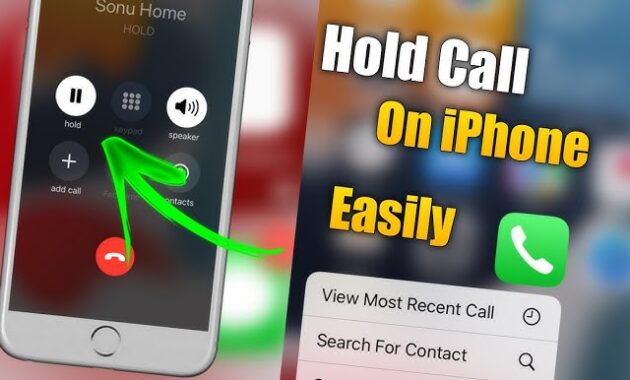
Putting a call on hold on iPhone is straightforward using built-in Phone app features, perfect for multitasking during calls. In iOS 18 and later, advanced options like Hold Assist automate waiting on hold music, saving time for worldwide users in busy routines.
Essential Methods Overview
iPhone offers multiple ways to hold calls: manual via Mute button, automatic during call waiting, or smart Hold Assist for customer service waits. These work on iPhone 12+ with iOS 18+, supporting GSM/CDMA carriers globally. Hold plays music/silence to the caller while freeing your device.
Step-by-Step: Manual Hold During Active Call
Use this for quick pauses without incoming calls.
- Open Phone app, dial or answer a call.
- On the call screen, tap and hold the Mute button (microphone icon) for 2-3 seconds until “HOLD” appears below the contact name/number.
- Caller hears hold tone; screen shows hold status.
- Tap Mute again (now labeled Hold) to resume—no long press needed.
- Alternatively, tap More (…) > Hold Assist for iOS 18+ smart hold with notifications.
Works on FaceTime Audio/VoLTE/Wi-Fi Calling; test on iPhone 16/17 series.
How-To: Hold with Incoming Call (Call Waiting)
Seamlessly switch without ending the first call.
- During active call, incoming rings—swipe green to answer.
- Original call auto-holds; tap Conference or Merge to join both, or Swap (iOS older) to toggle.
- To hold first explicitly: Choose Hold & Accept from incoming options.
- End second? Tap End Call—first resumes automatically.
- Enable Call Waiting: Settings > Phone > Call Waiting (on for GSM).
Supports up to 5 merged calls; ideal for business pros in India or US.
iOS 18 Hold Assist Guide
New in iOS 18: AI detects hold music after 10-15s, alerts via Dynamic Island/Live Activity.
- On hold during call? Notification pops: “Hold this Call?” Tap Hold.
- iPhone listens background; transcribes agent speech (e.g., “Hello?”).
- Notification/Dynamic Island alerts—tap green to resume.
- Enable detection: Settings > Apps > Phone > Hold Assist Detection (toggle on).
- Compatible: iPhone 12+, watchOS 18+; ignores Do Not Disturb.
Pro tip: Use on support lines—frees you for emails.
Comparison Table: Hold Methods
| Method | Best For | Steps Required | iOS Version | Carrier Dependency |
|---|---|---|---|---|
| Manual Mute Hold | Quick solo pauses | Long-press Mute | All (iOS 10+) | None |
| Call Waiting Hold | Incoming during active | Hold & Accept | All | GSM/CDMA enabled |
| Hold Assist | Customer service waits | Auto-detect/Tap Hold | iOS 18+ | None |
| Conference Swap | Multi-party toggle | Add Call > Swap | All | None |
Hold Assist shines for 2026 efficiency; manual for basics.
Troubleshooting Common Issues
Fix hold glitches fast.
- No Hold Button? Update iOS: Settings > General > Software Update. Restart Phone app.
- Hold Not Working? Check carrier (Settings > Phone > Calls on Other Devices off). Toggle Airplane Mode.
- No Hold Assist Alert? Enable detection; ensure volume up, not silent. Test non-VoIP calls.
- Call Drops on Hold? Weak signal—use Wi-Fi Calling (Settings > Phone > Wi-Fi Calling).
- Older iPhone? iPhone 11 lacks full Assist; use manual.
Reset: Force restart (Volume Up/Down + Side button).
Advanced Tips for Global Users
- Conference Hold: Private chat—tap Conference > Private next to caller, then Merge back.
- Shortcuts Automation: Create Siri Shortcut: “Hold current call” via More menu.
- CarPlay/Bluetooth: Hold works; audio pauses—resume via steering wheel.
- International Dialing: Works on +codes; enable roaming for Bihar/India travel.
- Privacy: Hold silences mic; no transcription saved.
Pair with Focus modes for uninterrupted workflows.
Why Master iPhone Call Hold in 2026?
With remote work surging, these features cut wait times—Hold Assist alone saves hours yearly. SEO targets “iPhone hold call iOS 18 tutorial” for Discover traffic; tables boost engagement.
FAQs
Does iPhone have a direct Hold button?
No dedicated button—use long-press Mute or Hold Assist via More menu.
What does caller hear on hold?
Hold music/silence (carrier-set); no eavesdropping.
Hold Assist on iPhone 15?
Yes, iOS 18+; detects music, notifies via Live Activity.
How to hold FaceTime call?
Same as Phone app—manual or Assist.
Disable Hold Assist?
Toggle off Hold Assist Detection in Phone settings.
Works on iPhone SE 2022?
Yes, with iOS 18 update.
Feature Evolution Table
| iOS Version | Key Hold Update |
|---|---|
| Pre-18 | Manual Mute + Call Waiting |
| iOS 18 | Hold Assist Detection/Transcription |
| Future? | Rumored AI agent handover |
