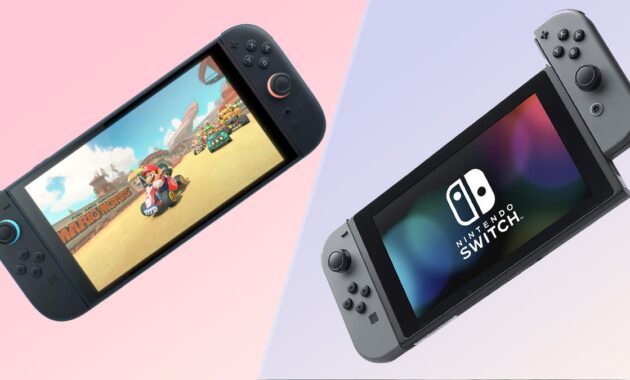
The moment has finally arrived. After years of rumors and speculation, the Nintendo Switch 2 is here, building upon the foundation of the most successful handheld hybrid console of all time. With its June 2025 release, gamers worldwide are now facing the classic dilemma: is it time to hang up the old Joy-Cons, or does the original Switch still have life left in it?
Before you rush to pre-order or empty your savings account, it’s crucial to understand exactly what you’re getting. While the Switch 2 introduces impressive 4K capabilities and mouse-like controllers, it also comes with a higher price tag and some surprising trade-offs, particularly regarding battery life and display technology .
This comprehensive comparison will break down every detail—from raw specs and real-world performance to the all-important backward compatibility—to help you decide if the upgrade is truly worth it for your play style.
At a Glance: The Specs Showdown
Before diving into the nuances, here is a head-to-head comparison of the key specifications across the three main models: the original Switch (2017), the Switch OLED (2021), and the all-new Switch 2 (2025).
Design and Display: Bigger, But Is It Better?
At first glance, the Switch 2 looks like a familiar friend. Nintendo hasn’t reinvented the wheel; the new console is simply a larger, more refined version of its predecessor. It measures in at 7.9 inches, making it noticeably bigger than even the OLED model . This increase in size accommodates the new 1080p LCD screen, a significant jump from the 720p panel of the original .
However, this is where the first major debate ignites. Many fans were hoping for an OLED screen, but Nintendo opted for a high-brightness LCD. According to detailed laboratory tests, the Switch 2’s LCD is significantly brighter than the original Switch’s screen and offers a better anti-reflective coating, making outdoor play much more feasible . But when it comes to contrast and deep blacks, the Switch OLED remains the king. The Switch 2’s contrast ratio, while improved over the 2017 model, can’t compete with the “infinite” contrast of a self-emissive OLED panel .
The Verdict: If you prioritize portability and a vibrant screen for dark environments, the Switch OLED holds its ground. If you want a sharper image with higher pixel density and plan to play in various lighting conditions, the Switch 2’s larger LCD wins.
Power and Performance: Enter the 4K Era
Under the hood, the Switch 2 is a different beast. Powered by a custom NVIDIA Tegra T239 chip with an Ampere GPU architecture, this console finally brings Nintendo into the modern era of graphical fidelity . The star of the show is DLSS (Deep Learning Super Sampling) . When docked, the console can render games at a lower resolution and use AI to upscale them to a stunning 4K output on your TV .
The increase from 4GB to 12GB of RAM is another game-changer. It means the system can handle more complex games, reduce load times drastically, and keep more assets in memory, leading to smoother transitions and less pop-in . For players coming from the original Switch, which often struggled with frame rates in demanding titles like The Legend of Zelda: Tears of the Kingdom, this upgrade will feel monumental.
Controllers and New Features: The Mouse Revolution
The new Joy-Con 2 controllers are the most innovative aspect of the Switch 2. They ditch the plastic rails for a satisfying magnetic attachment system, making the console feel more premium and rigid in handheld mode .
The biggest surprise is the optical sensor on the bottom rail, which allows the Joy-Con to be used as a mouse. By sliding the controller on a flat surface (like a desk or mouse pad), players can enjoy precise aiming in shooters like Metroid Prime 4: Beyond or point-and-click mechanics in strategy games like Civilization VII . Additionally, the new “C” button on the right Joy-Con activates GameChat, a built-in voice and video chat system that uses the console’s internal mic, finally eliminating the need for a clunky smartphone app .
The Price of Power: Battery Life and Storage
Here lies the catch. All that extra power has to come from somewhere, and unfortunately, it comes from the battery. While the Switch 2 packs a larger 5,220mAh battery (compared to the OLED’s 4,310mAh), the demanding new processor and 120Hz screen capability drain it much faster . Nintendo estimates a battery life of just 2 to 6.5 hours. Real-world tests on next-gen titles like Mario Kart World drained the console in under three hours .
On the plus side, storage is finally reasonable. With 256GB internal, you can actually download more than two triple-A games before needing an external card . However, be aware that the Switch 2 requires new microSD Express cards for expansion. Your old microSD cards from the Switch 1 will not work, and Express cards are currently more expensive .
Quick Comparison: Pros and Cons
The Game Library: Backward Compatibility and Exclusives
This is perhaps the most critical factor in your decision. The Switch 2 is almost fully backward compatible with the Switch 1 library, supporting both physical cartridges and digital downloads . This means you won’t lose access to your existing collection. In fact, many games will run better on the new hardware thanks to faster load times and more stable frame rates .
However, the transition to a new generation means the arrival of hardware-exclusive games. You will need a Switch 2 to play upcoming titles like Donkey Kong Bananza and the new Mario Kart World . Furthermore, Nintendo has announced “Switch 2 Edition” upgrades for classics like Breath of the Wild and Tears of the Kingdom, which will feature 4K resolution and enhanced graphics—but these upgrades will likely come at a small cost for existing owners .
For retro enthusiasts, the Switch 2 also adds GameCube games to the Nintendo Switch Online + Expansion Pass library, a feature exclusive to the new console .
How-To: Decide If You Should Upgrade
Making the leap to a new console is a personal decision. Follow this guide to determine which category you fall into.
Step 1: Assess Your Current Hardware.
- If you own a Switch Lite or a V1 (2017) Switch: The upgrade will be transformative. You are jumping from a small screen or aging battery to a massive 7.9-inch display, 4K output, and significantly faster performance .
- If you own a Switch OLED: The decision is harder. You already have a superior screen (in terms of contrast). You are upgrading for power, 4K, and exclusive games, not for a better handheld display .
Step 2: Analyze Your Gaming Habits.
- The “Bedroom/Basement” Gamer (Mostly Docked): Upgrade. You will benefit the most from the 4K resolution, DLSS technology, and stable frame rates on your TV .
- The “Commuter/Travel” Gamer (Mostly Handheld): Proceed with Caution. The shorter battery life (2-3 hours on heavy games) is a major drawback. You will likely need to invest in a high-capacity power bank immediately .
Step 3: Review Your Budget.
- The “Budget” Gamer: Stick with Switch 1. The library is massive, used games are cheap, and the console itself is now often found at a discount. There is no rush to move on .
- The “Early Adopter” Gamer: Upgrade. Factor in the cost of the console ($450), a Pro Controller ($90), and a microSD Express card (approx $45+ for 256GB). It’s an expensive entry fee .
Frequently Asked Questions (FAQs)
1. Can I use my old Joy-Cons on the Nintendo Switch 2?
Yes, but wirelessly. The Switch 2 uses a magnetic rail, so old Joy-Cons cannot physically slide onto the device. However, you can connect original Switch Joy-Cons wirelessly to play multiplayer games or to ensure compatibility with accessories like the Ring Fit Adventure ring .
2. Are all my old Switch games compatible?
Almost all of them. Nintendo has confirmed that “certain games may not be fully compatible,” but the list is incredibly small. The only major first-party game confirmed to have issues is Nintendo Labo Toy-Con 04: VR Kit, as the new console doesn’t fit the cardboard headset .
3. Does the Switch 2 have an OLED screen?
No. The Switch 2 features a 7.9-inch LCD screen. While it runs at 1080p and is brighter than the original Switch, it does not have the perfect blacks and vibrant contrast of the OLED model .
4. Is there a “Switch 2 Pro Controller”?
Yes. There is a new Switch 2 Pro Controller. It retails for approximately $89.99 / £89.99 and includes a port for a wired headset, a feature missing from the previous model .
5. Will the new Zelda games be exclusive to Switch 2?
Current announced titles like Pokémon Legends: Z-A and Metroid Prime 4: Beyond are cross-generation, meaning they will be playable on both consoles . However, future titles, especially new mainline 3D Zelda games built from the ground up, will almost certainly be exclusive to the Switch 2.
6. What is the “C” button for?
The “C” button on the right Joy-Con 2 activates GameChat, a new communication feature that allows for voice chat and, with a separate USB-C camera, video chat while you play .
Final Verdict
The Nintendo Switch 2 is a remarkable piece of hardware that successfully modernizes the hybrid concept. It solves the original’s biggest weaknesses—graphical power and storage—while introducing clever features like mouse controls and magnetic Joy-Cons .
Don’t upgrade if:
- You primarily play in handheld mode and value long battery life.
- You just bought a Switch OLED and are happy with its vibrant screen.
- You are on a tight budget and content with the massive existing library of Switch 1 games .
Do upgrade if:
- You want the best possible performance for future games like Mario Kart World.
- Your TV is 4K and you want to see Nintendo games with sharp, clean graphics via DLSS.
- Your current Switch is the original 2017 model, and you’re ready for a substantial leap in every category .
Ultimately, the Switch 2 isn’t about replacing a console; it’s about leveling up your experience. Whether you hit “A” to upgrade or “B” to wait, the game is far from over for either system.
