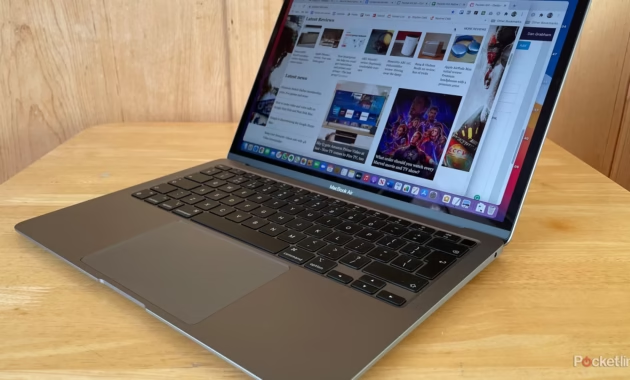
Apple’s laptop lineup in 2026 is the most powerful and diverse it has ever been. With the latest M4 and M5 chips powering the MacBook Air and MacBook Pro, the decision between Apple’s two laptop families has never been more nuanced—or more difficult. Do you go for the sleek, fanless design of the Air, or do you spring for the pro-level power of the MacBook Pro?
Whether you are a student heading to class, a business professional on the go, or a video editor pushing pixels, choosing the right machine is critical. This guide breaks down every difference in design, performance, display, and battery life to help you decide which Apple silicon laptop deserves a spot in your bag.
1. The Big Picture: Air vs. Pro in 2026
Before diving into the nitty-ggritty, it helps to understand the core philosophy behind each line.
The MacBook Air is Apple’s ultra-portable masterpiece. It’s designed for the vast majority of users who need a laptop for everyday tasks, content consumption, and light creative work. Its claim to fame is its featherlight weight and fanless design, making it completely silent.
The MacBook Pro is a mobile workstation. It is built for “pro” users who demand maximum performance for sustained periods. It features active cooling (fans), a brighter display with ProMotion technology, and significantly more graphical horsepower for tasks like video editing, coding, and 3D modeling.
Today, the lines blur slightly because the M4 MacBook Air is so capable, but the underlying mission of each laptop remains distinct .
2. Detailed Technical Specifications (2026 Lineup)
To understand the differences, let’s look at the current models available. Please note that rumors suggest an M5 MacBook Air is expected in Spring 2026, but as of now, the Air lineup is exclusively M4 .
3. Head-to-Head: Key Differences Explained
Performance and Cooling
The MacBook Air is powered by the M4 chip, which is incredibly snappy for everyday use. It handles 4K video streaming, heavy tab browsing in Safari, and even light photo editing in Photoshop with ease . However, because it lacks a fan, it may throttle (slow down) during intense, sustained tasks like exporting a long video file or running complex 3D renders .
The MacBook Pro, especially with the M4 Pro, M4 Max, or the new M5 chip, is built for endurance. The active cooling system (fans) allows it to maintain peak performance for hours . For a video editor, the Pro can be 1.7x faster in rendering and offers massive gains in AI tasks thanks to the enhanced Neural Engine in the M5 .
Display and Audio
This is one of the most significant differentiators. The MacBook Air features a beautiful Liquid Retina display, but it’s capped at 60Hz. The MacBook Pro features Liquid Retina XDR with ProMotion. This means:
- Smoother Scrolling: The 120Hz refresh rate makes cursor movement and scrolling feel fluid.
- Brighter Highlights: The Mini-LED technology allows for deep blacks and blindingly bright highlights, essential for HDR video editing .
- Better Audio: The Pro features a higher-fidelity six-speaker sound system with force-canceling woofers, while the Air has a capable, but less powerful, four-speaker setup .
Ports and Connectivity
The MacBook Air requires a dongle or hub for almost anything beyond charging and basic USB-C peripherals. It has two Thunderbolt ports on one side .
The MacBook Pro is the champion of connectivity. It includes an HDMI port for external monitors and an SDXC card slot, which is a lifesaver for photographers and videographers who need to offload footage quickly .
Portability
The MacBook Air is the undisputed winner here. The 13-inch Air weighs just 2.7 lbs and is so thin it disappears in a backpack. The 15-inch Air offers a massive screen while still weighing less than the 14-inch Pro .
4. Which One Should You Buy? (The Verdict)
Choosing between these two laptops ultimately comes down to your specific needs and budget.
Choose the MacBook Air M4 if:
- You are a Student or Casual User: You need a laptop for note-taking, research, streaming Netflix, and writing papers. The 13-inch Air is perfect for dorms and backpacks .
- You Prioritize Ultra-Portability: If you travel constantly or walk around campus all day, the lighter weight of the Air is a blessing .
- You are a General Professional: You spend your day in email, Slack, Microsoft Office, and Google Meet. The M4 Air handles this with silent, effortless grace.
- You Want the Best Value: The 15-inch MacBook Air is widely considered the “sweet spot” of the lineup, offering a large screen without the Pro price tag .
Choose the MacBook Pro (M4 Pro / M5) if:
- You are a Creative Professional: You edit 8K video, work in After Effects, or develop complex 3D scenes in Blender. You need the sustained power and the high-contrast XDR display .
- You are a Developer: Compiling large code bases requires the multi-core power of the M4 Pro or M5 chips .
- You are a Photographer: The built-in SD card slot and the color-accurate, bright display make the Pro the essential tool for on-location shoots .
- You Work with External Monitors: The Pro supports more external displays and higher bandwidth via HDMI without needing dongles.
A Note on the M5 MacBook Pro: The base 14-inch MacBook Pro now ships with the M5 chip. It offers a noticeable bump in performance over the M4, especially in AI and graphics tasks, and boasts an incredible 24-hour battery life. If you need the absolute latest performance in a “compact pro” form factor, this is the one .
5. How to Choose the Right Configuration
Once you’ve picked your family (Air or Pro), you need to configure it. Here is a quick “How-To” guide for picking your specs:
- RAM (Unified Memory): Always get 16GB minimum. While the base models now start at 16GB, this is the bare minimum for future-proofing. If you run virtual machines or edit large photos, consider 24GB or 36GB .
- Storage (SSD): 512GB is the sweet spot for most users. The base 256GB models fill up incredibly fast with modern apps, photos, and videos. You can always use external drives or iCloud, but internal storage is the fastest .
- Screen Size:
6. Frequently Asked Questions (FAQs)
Q: Is the MacBook Air good for video editing?
A: Yes, for light to moderate video editing. The M4 chip in the MacBook Air can handle 4K video in iMovie or DaVinci Resolve quite well. However, for professional work with long timelines, heavy effects, or 8K footage, the MacBook Pro with a fan and higher GPU cores is the better choice .
Q: When will the MacBook Air get the M5 chip?
A: According to industry analysts and recent reports, the M5 MacBook Air is expected to launch in the Spring of 2026 (around March or April). If you aren’t in a rush, waiting could net you a performance boost, though the M4 Air is already extremely capable .
Q: Why doesn’t the MacBook Air have fans?
A: The fanless design is what makes the MacBook Air completely silent and allows it to be so thin and light. The M4 chip is so power-efficient that for 95% of tasks, it doesn’t need a fan to stay cool .
Q: Can the MacBook Air support two external monitors?
A: Yes! With the M4 chip, the MacBook Air now supports two external displays (while the laptop lid is closed) .
Q: Which MacBook has the best battery life?
A: Currently, the 14-inch MacBook Pro with the M5 chip leads the pack with up to 24 hours of video playback, making it the longest-lasting MacBook ever . The MacBook Air models are close behind with up to 18 hours .
Q: Is the extra cost of the MacBook Pro worth it?
A: It depends entirely on your workflow. For a general user, no—the MacBook Air offers 90% of the experience at a fraction of the weight and cost. For a professional whose time is money (rendering, compiling, exporting), the Pro pays for itself in the hours it saves .
Conclusion
In the battle of MacBook Air vs. MacBook Pro in 2026, there is no single “best” laptop—only the best laptop for you.
The MacBook Air M4 stands as the champion of the everyday user. It’s lightweight, silent, powerful enough for almost anyone, and more affordable than ever. It is, for the vast majority of people, the laptop to beat .
The MacBook Pro remains the undisputed king of performance. Whether it’s the cutting-edge M5 model or the mighty M4 Max, it is a tool built for those who push their machines to the limit every single day.
Choose wisely, and you’ll have a companion that will serve you well for years to come.
