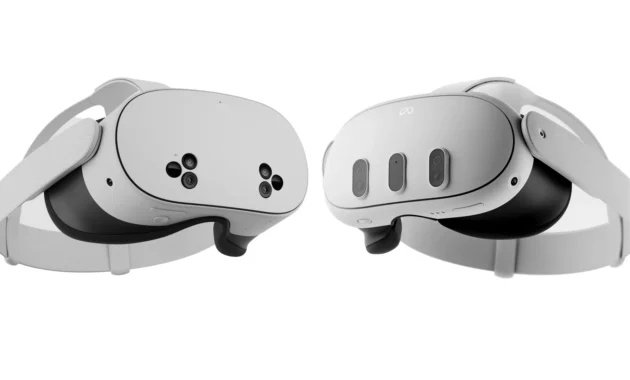
Meta’s VR lineup in 2026 presents a delightful dilemma: do you buy the ultra-affordable Meta Quest 3S or splurge on the higher-resolution Meta Quest 3? At first glance, they look like twins. Both are standalone headsets powered by the same lightning-fast Snapdragon XR2 Gen 2 chip, and both grant you access to the same massive library of games, fitness apps, and mixed reality experiences .
However, beneath the surface lies a critical trade-off. The Quest 3S saves you $200, but it achieves this by reverting to the lens and display technology of the older Quest 2. The Quest 3, on the other hand, pushes visual fidelity forward with sharp pancake optics.
So, is the visual bump worth the cash, or is the 3S the smartest deal in tech? Whether you are a VR newbie or a seasoned player looking to upgrade, this guide breaks down every difference—with tables—to help you make the perfect choice in 2026.
At a Glance: Quick Comparison Table
Before diving into the weeds of lenses and battery life, here is the hard data on how these two headsets stack up side-by-side.
1. The Price vs. Storage Showdown
This is the easiest part of the decision. The Quest 3S is designed to hit that impulse-buy price point.
- Quest 3S (The Saver’s Choice): At $299.99, it costs the same as the Quest 2 did at launch. This is the gateway drug for VR. If you opt for the 256GB model, it will cost you $399.99 .
- Quest 3 (The Enthusiast’s Choice): At $499.99, it is a premium device. However, Meta has shifted the configuration. The Quest 3 now only comes with 512GB of storage. If you hate deleting games, this is a major win .
Verdict: If you are on a strict budget, the 3S is the obvious winner. However, if you know you need space for large game files, the Quest 3’s 512GB becomes more attractive despite the higher entry price.
2. Visual Fidelity: The Clear Winner
If you want the best picture quality, the decision is simple. The Quest 3 is superior in almost every visual metric.
The Quest 3 features pancake lenses. These allow light to “fold” within the lens, making the headset slimmer and the image clearer across your entire field of view. The Quest 3S uses older Fresnel lenses (the same type as the Quest 2), which require you to look through the very center of the lens—the “sweet spot”—to see clearly; the edges will always be slightly blurry .
Furthermore, the resolution difference is stark when viewed side-by-side. Text is sharper on the Quest 3, and the “screen door effect” (the grid between pixels) is significantly reduced .
The “Porthole” Effect: The Quest 3S has a narrower field of view (96°), making it feel slightly like you are looking into the world through a diving mask. The Quest 3 (110°) offers a more natural, immersive peripheral view .
Winner: Meta Quest 3
3. Design, Comfort, and Audio
Holding them in your hands, you will notice the Quest 3 is slimmer. The pancake optics allow the front box to be thinner, which helps with weight distribution . The Quest 3S is bulkier, shifting more weight forward.
However, comfort is subjective. Both use the same soft Y-shaped strap and have the same connector for upgrading to the Elite Strap .
A Note on Audio: The Quest 3 has a standard 3.5mm headphone jack. The Quest 3S eliminates the headphone jack, pushing users toward USB-C headphones or Bluetooth earbuds . If you have a favorite pair of wired gaming headphones, this is a crucial detail.
Winner: Meta Quest 3 (for slim design and headphone jack)
4. Performance and Mixed Reality
Here is the most surprising part: Inside the headset, they are identical twins.
Both run on the Snapdragon XR2 Gen 2 chip with 8GB of RAM . This means:
- Loading times are the same.
- Game performance (frame rates) are the same.
- Multitasking capabilities are the same.
- Mixed Reality Passthrough: Both use the same 4MP cameras for full-color passthrough, allowing you to see your room and place virtual objects within it .
If you are buying the headset to play Batman: Arkham Shadow (which is bundled with the 3S) or Asgard‘s Wrath 2, both headsets will run them flawlessly.
Winner: Tie
5. Battery Life: A Twist
Logic dictates that a bigger battery means longer life. The Quest 3 has a larger cell (5,060 mAh), while the 3S is smaller (4,324 mAh) .
However, because the Quest 3S is pushing far fewer pixels to a lower-resolution screen, it is more power-efficient. In testing, the Quest 3S tends to outlast the Quest 3 by about 15-20 minutes .
- Quest 3S: ~2.5 hours
- Quest 3: ~2.2 hours
Winner: Meta Quest 3S
How to Choose: A Buyer’s Guide Flowchart
Still unsure? Follow this simple guide to find your perfect match.
Step 1: What is your budget?
- Under $300: Buy the Quest 3S.
- Under $500: Continue to Step 2.
Step 2: Is this your first VR headset?
- Yes: Buy the Quest 3S. You won’t miss what you’ve never seen, and the savings are significant.
- No (I’m upgrading from Quest 2): Continue to Step 3.
Step 3: Did the “screen door effect” on Quest 2 bother you? Do you watch movies in VR?
- Yes (I want the clearest picture possible): Buy the Quest 3. The pancake lenses are a game-changer for media consumption.
- No (I only play active games like Beat Saber): Buy the Quest 3S. The visuals are good enough for fast-paced action, and you get longer battery life.
Frequently Asked Questions (FAQs)
1. Can the Quest 3S play the same games as the Quest 3?
Yes. Since they have the exact same processor and RAM, the entire Meta Quest library is compatible with both headsets. There are no 3S-exclusive or 3-exclusive games based on hardware capability .
2. Is the Quest 3S good for PC VR gaming?
It works, but with caveats. While you can use Quest Link (wired or wireless) to play PC VR games like Half-Life: Alyx, the lower resolution of the 3S means the image will look softer. One user noted that the PC connection software can be finicky, requiring occasional troubleshooting . For dedicated PC VR, the Quest 3’s sharper display is worth the extra cost.
3. Which headset is better for fitness?
This is a tie. The Quest 3S is lighter on the wallet, but the Quest 3 is lighter on the face (slimmer design). However, the Quest 3S’s longer battery life means you can get through that extra-long workout session without the headset dying on you . The sweat resistance is considered similar between models, though users recommend sweatbands for both .
4. Does the Quest 3S have the same mixed reality as the Quest 3?
Yes. Both headsets feature full-color passthrough, allowing you to see your environment in color and place holograms in your room. The depth sensor and camera quality are rated as equal .
5. Why is there no headphone jack on the Quest 3S?
Meta removed the 3.5mm jack to cut costs and simplify the design. You will need to use USB-C headphones or Bluetooth earbuds (though Bluetooth can introduce slight audio lag, which is bad for rhythm games) .
6. Which one should I buy if I wear glasses?
The Quest 3 is generally better for glasses wearers. The pancake optics provide a larger “eye box,” making it easier to see the full screen while wearing frames. Both headsets support prescription lens inserts, but physical fit is tighter on the 3S due to the smaller facial interface borrowed from the Quest 2 era .
The Final Verdict: Save or Upgrade?
Choose the Meta Quest 3S ($299.99) if:
- You are a first-time VR user and want the lowest risk entry point.
- You primarily play active games (Beat Saber, Supernatural, Eleven Table Tennis) where you are moving too much to notice pixel density.
- You want the longest possible battery life for standalone use.
- You don’t mind using Bluetooth earbuds or USB-C audio .
Choose the Meta Quest 3 ($499.99) if:
- You are a tech enthusiast or upgrading from Quest 2 and demand the best clarity.
- You plan to watch a lot of movies or Netflix in the headset (the pancake lenses make a massive difference for text and video).
- You intend to use PC VR streaming regularly and want a sharper image.
- You have a library of wired 3.5mm gaming headsets you want to use
