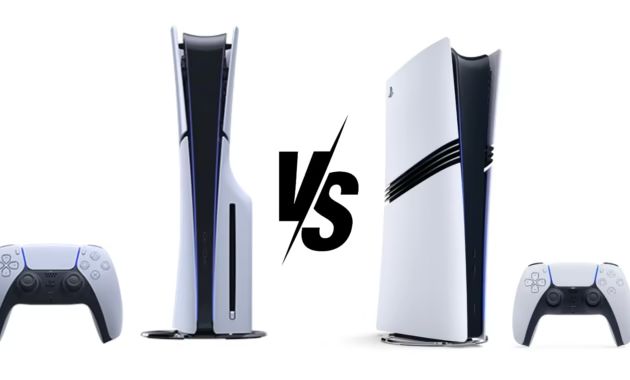
The console war has evolved. It’s no longer Sony versus Microsoft, but rather, Sony versus itself. With the release of the PlayStation 5 Pro in late 2024, the question on every gamer’s mind isn’t just which console to buy, but whether the premium price tag of the Pro model translates into a premium gaming experience.
At a glance, the math is simple: the PS5 Pro costs $200 more than the standard PS5 Slim. But in practice, the decision is far more nuanced. Is the PlayStation 5 Pro a future-proof beast that redefines console fidelity, or is it a luxury item for the few with cash to burn? After a year of real-world testing and a growing library of enhanced games, we have a clear picture of the gap between these two machines.
If you are staring at your screen wondering, “Should I save the cash or splurge on the Pro?”, you have come to the right place. We break down the specs, the real-world performance, the hidden costs, and ultimately, who should buy which console.
The $200 Question: Comparing Specs and Hardware
Before we talk about how games feel, we need to talk about what is under the hood. The PS5 Pro isn’t a new generation; it is a mid-cycle refresh, similar to the PS4 Pro. This means it keeps the same core CPU architecture as the standard PS5 but massively overhauls the graphics department.
Here is how the specifications stack up head-to-head:
Graphics and Performance: Beyond the Numbers
The spec sheet tells a story of raw power, but the real question is: can you actually see the difference on your screen?
The Standard PS5: Still a Powerhouse
Let’s be clear: the original PS5 is not “weak.” It remains an exceptional console capable of delivering stunning 4K visuals at up to 120fps in many titles. Games like God of War Ragnarök and Horizon Forbidden West look breathtaking on the base model. It handles ray tracing admirably, though often requiring a trade-off. Typically, players must choose between a high-frame-rate “Performance Mode” (targeting 60fps) or a high-fidelity “Resolution Mode” (targeting 30fps with ray tracing) .
The PS5 Pro: Eliminating the Compromise
The PS5 Pro is designed to make that choice obsolete. The goal is to deliver stable 60fps gameplay with ray tracing enabled—a feat the base model struggles with in the most demanding games .
This is achieved through two key technologies:
- Advanced Ray Tracing: The Pro features custom hardware that allows for 2x to 3x faster ray tracing operations. In games like *Marvel‘s Spider-Man 2*, this means reflections on glass windows are crisper and more accurate without tanking the frame rate .
- PlayStation Spectral Super Resolution (PSSR): This is Sony’s AI-powered upscaling answer to NVIDIA’s DLSS. It uses machine learning to take a lower-resolution image and upscale it to near-4K quality with incredible sharpness. This allows the console to render games at a lower base resolution (saving performance) while outputting a gorgeous 4K picture .
The Catch: Enhanced Games Only
Here is the most critical caveat. The PS5 Pro’s magic only works on games specifically patched to be “PS5 Pro Enhanced.” Currently, there are over 100 games in this category, including heavy hitters like Final Fantasy VII Rebirth, Alan Wake II, and The Last of Us Part I . If you are playing a standard PS5 game that hasn’t received a Pro patch, you will see modest improvements (thanks to the extra GPU headroom), but you won’t experience the transformative effects of PSSR or advanced ray tracing .
Verdict: The PS5 Pro offers a tangible visual upgrade, but only for a specific (though growing) list of titles. For non-enhanced games, the experience is largely a tie.
The Hidden Costs of “Pro”
When Sony announced the PS5 Pro at $699.99, the price seemed steep. However, with recent market adjustments and tariffs, the price has climbed to $749.99 . But for many, the sticker price isn’t the full story.
The Disc Drive Dilemma
The most controversial aspect of the PS5 Pro is that it is a digital-only console by default. Unlike the $549.99 standard PS5, which comes with a 4K Blu-ray drive, the Pro ships without one. If you own a collection of PS4 or PS5 physical games, or if you simply prefer buying used discs to save money, you will need to purchase the optional disc drive separately for an additional $79.99 .
If you factor in the disc drive and the optional vertical stand (another $30), the price of the PS5 Pro soars to over $850. That is a significant jump from the $550 all-in-one package of the standard PS5.
| Configuration | Standard PS5 (Disc) | PS5 Pro (Base) | PS5 Pro (with Disc Drive) |
|---|---|---|---|
| Console Price | $549.99 | $749.99 | $749.99 |
| Disc Drive | Included | Not Included | +$79.99 |
| Total Cost | $549.99 | $749.99 | $829.98 |
For the price of a tricked-out PS5 Pro, you could buy a standard PS5 and three full-priced AAA games, with money left over.
How-To: Optimize Your PlayStation 5 Display Settings
Whether you end up buying a PS5 or a PS5 Pro, you won’t see the benefits unless your display and settings are configured correctly. Many users plug in their console and never touch the settings, leaving performance on the table. Follow this quick guide to ensure you’re getting the best picture possible.
Step 1: Check Your TV and Cable
- TV Compatibility: Ensure your TV supports HDMI 2.1. This is essential for 4K at 120Hz and Variable Refresh Rate (VRR). Look for the specs in your TV’s manual .
- The Right Cable: Use the ultra-high-speed HDMI cable that came with the console, or purchase a certified HDMI 2.1 cable. Older cables lack the bandwidth for 4K/120fps .
Step 2: Configure PS5 System Settings
- Navigate to Settings > Screen and Video.
- Video Output: Set “Resolution” to Automatic. Ensure “4K Video Transfer Rate” is set to Automatic (or -2 if you experience flickering).
- VRR: Set “VRR” (Variable Refresh Rate) to Automatic. This matches the screen’s refresh rate to the game’s frame rate, eliminating screen tearing.
- 120Hz Output: Set “Enable 120Hz Output” to Automatic.
Step 3: In-Game Settings
- Standard PS5: In graphically intensive games, you will likely have to choose. For competitive shooters, choose Performance Mode for 60fps. For slow-paced, scenic games, Fidelity/Resolution Mode offers better eye candy at 30fps.
- PS5 Pro: Look for specific “Pro” modes. Many Pro-enhanced games now offer a mode that delivers 60fps with Ray Tracing, giving you the best of both worlds. Enable this if available .
Storage and Connectivity: A Glimpse of the Future
Beyond pure graphics, the PS5 Pro offers tangible quality-of-life improvements.
- Storage: With games like Call of Duty regularly exceeding 150GB, the Pro’s 2TB SSD is a massive win. It effectively doubles the usable space of the standard PS5’s 1TB drive, meaning fewer agonizing decisions about which game to delete .
- Wi-Fi 7: While the PS5’s Wi-Fi 6 is perfectly fast for downloading games and playing online, the Pro’s Wi-Fi 7 support makes it one of the most future-proofed consoles on the market for those with high-end routers .
FAQs: Your Burning Questions Answered
Q: Is the PS5 Pro worth it if I only have a 1080p TV?
A: Probably not. The PS5 Pro’s main features—PSSR upscaling and advanced ray tracing—are designed to shine at 4K resolutions. On a 1080p screen, you will get slightly more stable frame rates, but the visual jump will be minimal. The standard PS5 is a better value for 1080p gaming .
Q: Will my old PS4 games look better on the PS5 Pro?
A: Yes, potentially. The PS5 Pro features a “Game Boost” mode that can stabilize frame rates and improve the resolution on select PS4 and PS5 games that haven’t been officially patched. However, it won’t add ray tracing or PSSR to them. The improvement is noticeable but not transformative .
Q: How many games currently support PS5 Pro enhancements?
A: As of early 2026, there are over 100 PS5 Pro Enhanced games available. This list continues to grow with new releases like Death Stranding 2 and Ghost of Yōtei, which are designed to leverage the Pro hardware from day one .
Q: Does the PS5 Pro run hotter or louder than the standard PS5?
A: Generally, no. Despite the more powerful GPU, the PS5 Pro features an improved cooling system. Reviews indicate that it runs at similar temperature and noise levels to the PS5 Slim, making it perfectly acceptable for long gaming sessions .
Final Verdict: Who Should Buy Which?
After comparing the specs, the costs, and the real-world performance, the “winner” depends entirely on your profile as a gamer.
Buy the Standard PlayStation 5 if:
- You are a value-conscious gamer. You want the best bang for your buck. The PS5 plays the exact same library of games for $200 less.
- You prefer physical media. The standard disc model is cheaper than a Pro with an add-on drive.
- You own a 1080p or 4K/60Hz TV. You won’t utilize the Pro’s 120Hz or VRR advantages.
- You play a mix of games. If you jump between indies, sports games, and the occasional AAA blockbuster, the base PS5 is more than enough .
Buy the PlayStation 5 Pro if:
- You own a high-end 4K/120Hz TV or monitor. You have the display to actually see the extra pixels and smoothness.
- You demand the absolute best graphics. You want ray tracing without sacrificing the fluidity of 60fps.
- You are a digital hoarder. The 2TB SSD is a lifesaver for those who refuse to delete their massive game libraries.
- You are a new buyer looking to “future-proof.” If you plan to keep this console for the next 5-6 years and play every demanding exclusive coming down the pipeline, the Pro gives you headroom .
