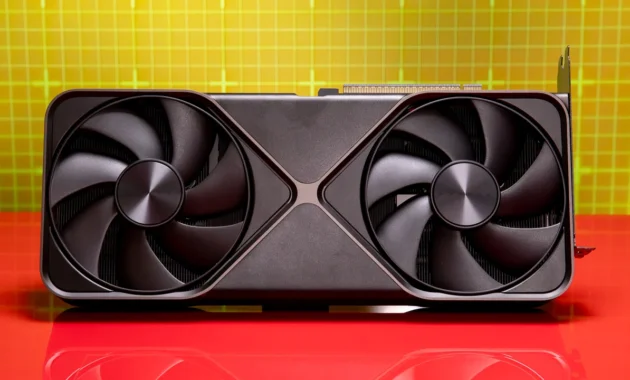
The GPU market in Fall 2026 is a tale of two realities. On one hand, we are finally past the chaotic stock shortages of the early 2020s. You can walk into a store (or click “buy”) and actually find a graphics card in stock. On the other hand, the market is navigating a DRAM pricing crisis driven by AI demand, making memory the most valuable commodity in tech .
This generation has been defined by Nvidia’s RTX 50-series, AMD’s RDNA 4 lineup, and Intel’s emerging Arc presence. While Nvidia still wears the performance crown with the RTX 5090, AMD has strategically captured the “sweet spot” of the market with aggressive pricing and generous VRAM allocations . Intel continues to disrupt the entry-level, proving that three-player competition is healthy.
If you are building a new rig or upgrading, timing is critical. Experts warn that prices have likely bottomed out and are poised to rise again due to component costs . Whether you are gaming in 1080p, diving into 4K, or building an AI workstation, this guide breaks down the absolute best video cards of Fall 2026.
The State of the GPU Market: What You Need to Know
Before diving into specific models, it is crucial to understand the landscape. The days of generational leaps in raw performance are plateauing; the focus now is on software efficiency, ray tracing, and AI-powered upscaling .
- The VRAM Floor has Risen: 8GB cards are now considered the bare minimum for entry-level, and they struggle with modern textures at 1440p. For mid-range and above, 16GB is the new standard .
- Upscaling is King: DLSS 4 (Nvidia) and FSR 4 (AMD) are no longer optional features; they are integral to performance. Nvidia leads in quality with its Multi-Frame Generation, but AMD’s FSR 4 has closed the gap significantly .
- Power Supply Matters: With high-end cards drawing 400-600W, ensure your Power Supply Unit (PSU) can handle transient power spikes .
Best Video Cards of Fall 2026
To help you navigate the options, we have broken down the best cards by performance tier. The table below summarizes our top picks based on price, performance, and availability.
1. Entry-Level Champion (1080p): Intel Arc B570 / B580
For years, the budget segment was a wasteland of underpowered cards. Intel has changed that in 2026. The Arc B580, priced at $250, is a revelation. It offers 10GB of VRAM—critically more than Nvidia’s equivalent offerings—and delivers frame rates that rival the RTX 5060 . It is the best choice for esports titles and moderate AAA gaming at 1080p.
- Runner-up: The AMD Radeon RX 9060 XT 8GB is faster in raw rasterization but is held back by its 8GB frame buffer. If you don’t play texture-heavy modded games, it is a solid performer at $280 .
2. The 1440p Sweet Spot: AMD Radeon RX 9060 XT (16GB)
If you are a mainstream gamer, stop here. The RX 9060 XT 16GB is arguably the best all-around card of 2026. At $350, it provides the VRAM headroom that the upcoming generation of games will demand, matching the performance of cards that cost significantly more just two years ago . It competes directly with the RTX 5060 Ti (16GB) but undercuts it by nearly $80, making the value proposition undeniable .
3. The Performance King (Value): AMD Radeon RX 9070 XT
The high-end market has been turned upside down by the RX 9070 XT. At its $600 MSRP, it delivers near-flagship 4K performance. It matches or beats the RTX 5070 Ti in many rasterization scenarios and includes 16GB of VRAM . The only reason to look elsewhere is if you absolutely need Nvidia’s superior ray tracing in path-traced games like Cyberpunk 2077.
- Note: The RTX 5070 Ti is an excellent card, but at a 25% price premium over the 9070 XT, it is hard to recommend for pure gamers .
4. The Unrivaled Enthusiast: Nvidia GeForce RTX 5090
There is no debate here. The RTX 5090 is the most powerful consumer graphics card on the planet. With a 32GB VRAM buffer and a 3DMark Steel Nomad score exceeding 14,000, it is an absolute monster for 8K gaming, AI development, and professional rendering . However, its $1,999 MSRP (often higher in reality) puts it in a league of its own.
- Warning: Skip the RTX 5080. At $999, it offers only a 15% gain over the 5070 Ti for a 33% price hike, making it the worst value of the generation .
Nvidia vs. AMD vs. Intel: A Feature Comparison
Choosing a brand is about more than just raw frame rates. Your decision should hinge on which ecosystem you prefer.
| Feature | Nvidia (RTX 50-Series) | AMD (Radeon RX 9000-Series) | Intel (Arc B-Series) |
|---|---|---|---|
| Upscaling Tech | DLSS 4 (Multi-Frame Gen) | FSR 4 (ML-Based) | XeSS 2 |
| Ray Tracing | Excellent (Dedicated RT Cores) | Good (Big improvement in RDNA 4) | Moderate |
| VRAM Capacity | Moderate (12GB on 5070) | Generous (16GB standard on 9060 XT) | Good (10GB on B580) |
| Content Creation | NVENC Encoder (Best for streaming) | AMF Encoder (Solid) | AV1 Support (Great) |
| AI Workloads | CUDA Dominance (Best for training) | ROCm 7 (Good for inference) | Emerging |
| Best For | Maximum RT, Streaming, AI Training | Best Price/Performance, Gaming | Budget 1080p Gaming |
How To Choose the Right Graphics Card in 2026
Selecting a GPU can feel overwhelming, but breaking it down into a simple workflow can help. Follow this “How-To” guide to ensure you get the right card for your needs.
Step 1: Define Your Resolution and Refresh Rate
This is the most important question. Your monitor dictates the GPU you need.
- 1080p (60-144Hz): You are in the Entry-Level tier. Look at the Intel Arc B580 or RX 9060 XT 8GB. You do not need to spend more than $300 .
- 1440p (144Hz+): This is the current “sweet spot.” Target the Mainstream or Mid-Range tier. The RX 9060 XT 16GB or RX 9070 are perfect here .
- 4K (60Hz+): You need power. Look at the High-End or Enthusiast tier. The RX 9070 XT is the entry point, while the RTX 5090 is the ultimate .
Step 2: Calculate Your Power Supply Headroom
Once you have a card in mind, check your PSU. Modern GPUs have high transient spikes .
- For cards like the RTX 5070 / RX 9070: A 650W-750W PSU is recommended.
- For the RTX 5090: You will need a robust 850W-1000W unit with the new 12V-2×6 connectors .
Step 3: Prioritize VRAM Over Minor Speed Bumps
In Fall 2026, VRAM is your future-proofing. Do not buy an 8GB card if you plan to keep your PC for more than two years. Games are already utilizing more than 12GB at high settings . Always choose the 16GB variant over the 8GB variant of the same card, even if it costs a bit more.
Step 4: Match the Card to Your CPU
Avoid bottlenecking. Pairing an RTX 4090 with an old budget CPU wastes performance. A balanced system ensures you get the frames you pay for.
Why This Generation Feels Different
There is a growing sentiment among the PC building community that we are entering a plateau of graphical fidelity. As one user on the Newegg Community noted, *”Theoretically a GPU today should last like 10-20 years because graphics are not going to improve that much anymore. We really don’t need any more video power, we just need… optimizations”* .
This is why focusing on VRAM and software features is more important than chasing the last 5% of raw performance. Nvidia’s DLSS 4 and AMD’s FSR 4 are effectively giving you “free” performance, making the $350-$600 price range the most competitive and intelligent place to shop .
Frequently Asked Questions (FAQs)
Q: Is it worth waiting for GPU prices to drop further in late 2026?
A: Probably not. Analysts and manufacturers like AMD have signaled that DRAM and production costs are rising. The current prices, especially on cards like the RX 9070 XT, are likely the “floor” for this generation. If you need an upgrade, buying now is advisable .
Q: Is 8GB of VRAM enough for gaming in 2026?
A: For 1080p gaming on medium settings in older titles, yes. However, for modern AAA games at high textures, or any gaming at 1440p, 8GB is insufficient. It causes stuttering and texture pop-in. Aim for 12GB minimum, but 16GB is the new standard for longevity .
Q: Which is better for streaming: Nvidia or AMD?
A: Nvidia holds a clear lead here. Their NVENC encoder is widely regarded as the best in the business, offering high-quality streams with minimal performance impact. AMD’s AMF encoder is good but not quite as polished .
Q: I mainly play competitive shooters like Valorant and CS2. Do I need a high-end card?
A: No. These games are CPU-intensive and run well on almost anything. You would be better served by a budget-friendly card like the Intel Arc B580 and investing the savings into a high-refresh-rate monitor .
Q: What is the difference between DLSS 4 and FSR 4?
A: Both use AI to upscale lower-resolution images to look like higher resolution, boosting frame rates. DLSS 4, exclusive to Nvidia RTX 50-series, offers “Multi-Frame Generation” (generating up to three frames for every one rendered). FSR 4 is AMD’s latest AI-based solution, which is a massive improvement over FSR 3 and works across RDNA 4 cards, though it currently supports fewer games .
Q: Will Intel release new GPUs later in 2026?
A: Yes. Intel has confirmed its Xe3P architecture is launching in 2026, targeting both desktops and AI platforms. This means the Arc B-Series (Battlemage) may see successors or price adjustments later in the year, but the current B580 remains a fantastic value now .
Conclusion
The Fall of 2026 offers a refreshingly clear GPU market. The era of “just buy the cheapest Nvidia card” is over. For the vast majority of users, the AMD Radeon RX 9060 XT 16GB and RX 9070 XT offer the best blend of performance, future-proofing, and value. Intel has proven itself as a legitimate budget contender with the Arc B580, while Nvidia remains the go-to for deep-pocketed enthusiasts and professionals who need the absolute best ray tracing or AI compute power with the RTX 5090.
Focus on your resolution, prioritize VRAM, and buy now—because this market stability might not last forever.
