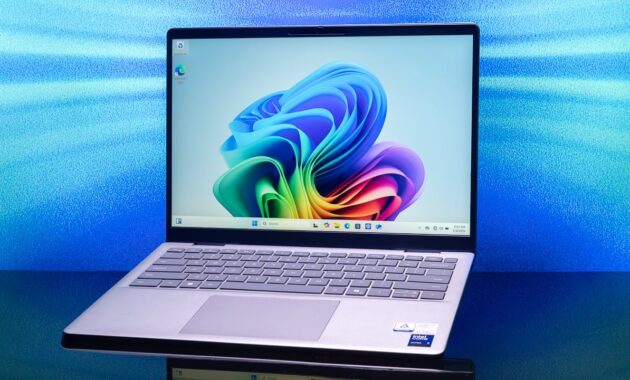
The hunt for the perfect laptop in Fall 2026 is more exciting—and potentially more confusing—than ever. With Apple’s powerful M4 chips, Intel’s revolutionary Panther Lake processors, and Qualcomm’s Snapdragon X Series dominating the Windows landscape, the market is flooded with AI-powered machines that promise desktop-level performance in slim, light frames.
Whether you’re a student heading back to school, a digital nomad, a creative professional, or a hardcore gamer, this guide cuts through the noise. We’ve analyzed expert reviews from leading sources like CNET, Mashable, and Trusted Reviews to bring you the definitive ranking of the best laptops available right now .
Quick Comparison: Top Laptop Picks for Fall 2026
Before we dive into the details, here’s a snapshot of the best laptops across different categories to help you get started.
How to Choose the Right Laptop in 2026: Key Factors
With technology advancing rapidly, knowing what to look for is half the battle. Here’s what matters most this year.
1. The Processor (CPU): The AI Era is Here
The CPU is the brain of your laptop. In 2026, the focus is on Neural Processing Units (NPUs) for AI tasks.
- For Mac Users: The M4 chip (in the MacBook Air) offers incredible efficiency, while the M4 Pro/Max (in MacBook Pro) is for power users. The new M5 chips in higher-end Pros take it even further .
- For Windows Users: You have three main choices:
- Intel Core Ultra (Series 2 & 3 – “Panther Lake”): These offer a great balance of power and efficiency with strong integrated graphics .
- AMD Ryzen AI 300 (“Strix Point” / “Gorgon Point”): Excellent multi-core performance and top-tier integrated graphics for gaming without a dedicated GPU .
- Qualcomm Snapdragon X Elite / Plus: These ARM-based chips provide exceptional battery life and are always connected. However, double-check compatibility for legacy apps .
2. Memory (RAM) and Storage (SSD)
- RAM: 16GB is the new standard for smooth multitasking and future-proofing. Power users and gamers should opt for 32GB .
- Storage: Always choose an SSD (Solid State Drive) . 512GB is a comfortable minimum, but 1TB is recommended if you store lots of files or games.
3. Display: OLED Takes the Crown
OLED screens are becoming standard on premium laptops, offering perfect blacks and vibrant colors.
- Resolution: 1080p is fine for budget laptops, but 2K/3K resolutions are sharper.
- Refresh Rate: A 120Hz or higher refresh rate makes scrolling and gaming feel buttery smooth .
The Best Laptops of Fall 2026: In-Depth Reviews
Here are our top picks, tested and reviewed for real-world performance.
Best MacBook for Most People: Apple MacBook Air 15-inch (M4)
Apple did the unthinkable in 2026: they made their best laptop even more affordable. The 15-inch MacBook Air M4 is a masterpiece of engineering .
- Why it’s great: The M4 chip is “almost overkill” for daily tasks, handling everything from 4K video exports to hundred-tab browsing without a fan—meaning it’s completely silent. The 15.3-inch Liquid Retina display is bright and beautiful, and the new 12MP Center Stage camera makes you look great on video calls .
- Who it’s for: Students, office workers, and anyone who wants a premium, portable, and powerful machine without needing the extreme power of a MacBook Pro.
- The Catch: It only has a 60Hz refresh rate, and the base model’s 256GB SSD fills up fast .
Best Windows Laptop for Most People: Microsoft Surface Laptop 7
For the first time in years, a Windows laptop can truly go toe-to-toe with the MacBook Air. The Surface Laptop 7, powered by the Snapdragon X Elite, is a stunning piece of kit .
- Why it’s great: It boasts a phenomenal build quality, a bright 120Hz touchscreen, and a haptic touchpad that feels incredible. Battery life is a standout feature, often exceeding 20 hours in tests .
- Who it’s for: Windows loyalists who want a sleek, modern laptop with all-day (and night) battery life.
- The Catch: As an ARM-based laptop, some niche legacy apps may not run natively .
Best for Battery Life: HP OmniBook 5 14
If you never want to see a charger, this is your laptop. The HP OmniBook 5 14, another Snapdragon X Series device, has shattered battery life records .
- Why it’s great: CNET reported this laptop lasting over 28 hours on a single charge. It combines this incredible endurance with a vivid OLED display, a stylish design, and a generous 1TB SSD for under $1,000 .
- Who it’s for: Digital nomads, students with back-to-back classes, and travelers.
- The Catch: The OLED display isn’t the brightest on the market, and you face the same ARM compatibility questions as the Surface Laptop .
Best Gaming and Creator Laptop: MSI Prestige 14 Flip AI+
This is one of the most exciting laptops of the year. Powered by Intel’s new Panther Lake processor, it features integrated Intel Arc graphics so powerful that it can run AAA games smoothly without a bulky, power-hungry dedicated GPU .
- Why it’s great: It offers a unique combination of ultraportable design, all-day battery life, and the ability to play modern games at 1080p. It’s a thin-and-light laptop that doesn’t sacrifice fun .
- Who it’s for: Gamers and creators who need portability but don’t want a heavy “gaming” laptop.
- The Catch: The display is only 60Hz, which is a miss for a gaming-focused device .
Best High-End Gaming Desktop Replacement: Alienware 18 Area-51
For those who want the absolute pinnacle of gaming performance, the Alienware 18 Area-51 is a beast. It’s designed to handle the most demanding titles with Nvidia’s top-tier RTX 5000-series graphics .
- Why it’s great: It offers “serious gaming power,” a wonderfully tactile keyboard, and that classic, bold Alienware design. It’s a desktop replacement in every sense.
- Who it’s for: Hardcore gamers and enthusiasts with no budget constraints.
- The Catch: It is “horrendously expensive” and has very poor battery life .
Laptops to Avoid (Or Buy with Caution)
While the market is strong, a few trends warrant caution:
- 8GB RAM Models: In 2026, 8GB of RAM is simply not enough for smooth multitasking, especially with AI-powered features running in the background. Avoid these unless you have an extremely limited budget and simple needs .
- First-Gen ARM Holdouts: While Snapdragon X is a success, always verify that specific professional or academic software is compatible with the ARM architecture before buying .
Step-by-Step Guide: How to Buy Your Perfect Laptop
Follow this simple “How-To” guide to ensure you make the right choice.
Step 1: Define Your “Why”
- Student: Prioritize battery life, portability, and durability. (Consider: MacBook Air, HP OmniBook).
- Professional: Balance performance and portability. (Consider: Surface Laptop 7, Dell Latitude).
- Creator/Gamer: Focus on CPU/GPU power, RAM, and display quality. (Consider: MacBook Pro, MSI Prestige, Alienware).
Step 2: Set Your Budget
- Under $700: Stick to Chromebooks or entry-level Windows laptops (Acer Aspire) .
- $700 – $1,200: The “sweet spot.” You can find excellent machines like the MacBook Air M4 (on sale) or HP OmniBook .
- $1,200 – $2,000+: Premium ultrabooks and high-performance devices .
Step 3: Match Specs to Needs
Use this checklist:
- CPU: M4, Intel Core Ultra 7, AMD Ryzen AI 9, or Snapdragon X Elite.
- RAM: Minimum 16GB.
- Storage: Minimum 512GB SSD.
- Display: OLED preferred for media; 120Hz for smoothness .
Step 4: Read Recent Reviews
Check the publication dates. A review from 2025 is outdated. Focus on hands-on tests from Fall 2026 to ensure you’re getting the latest information on drivers and performance.
Frequently Asked Questions (FAQs)
1. Is it worth waiting for the “next big thing” in laptops?
Generally, no. With the rapid release cycles of Intel, AMD, Apple, and Qualcomm, there will always be a “next big thing” on the horizon. If you find a laptop that meets your needs and budget today, it’s a safe buy. However, if you don’t need a laptop urgently, CES 2027 in January might introduce new form factors.
2. How much RAM do I really need for AI features?
While many AI tasks run in the cloud, on-device AI (Copilot+ features) benefits from more memory. 16GB is the baseline for a smooth AI-enhanced experience in Windows 11 and macOS Sequoia. For heavy local AI workloads (like image generation), 32GB or more is recommended .
3. Are gaming laptops good for work?
Absolutely. A laptop like the Lenovo Legion 5i or MSI Prestige offers a powerful CPU and plenty of RAM that is excellent for video editing, 3D modeling, and software development. The trade-off is usually weight and battery life compared to a standard ultrabook .
4. Do I need Wi-Fi 7?
Wi-Fi 7 is the latest standard, offering faster speeds and lower latency. It’s great for cloud gaming and large file transfers. However, it’s a “future-proofing” feature, as many networks still rely on Wi-Fi 6/6E. If you plan to keep your laptop for 4+ years, it’s a nice feature to have .
5. What is a Copilot+ PC?
A Copilot+ PC is a Windows computer designed to handle specific AI tasks directly on the device. This requires a powerful NPU (Neural Processing Unit). These laptops offer features like real-time captions, advanced Windows Studio Effects (background blur, eye contact), and the controversial Recall feature. Most new Snapdragon X, Intel Core Ultra, and AMD Ryzen AI 300 laptops are Copilot+ PCs .
Conclusion
The Fall of 2026 is a fantastic time to buy a laptop. The competition between Apple, Intel, AMD, and Qualcomm is driving incredible innovation, giving consumers more choice than ever.
For the vast majority of users, the Apple MacBook Air 15-inch (M4) and the Microsoft Surface Laptop 7 represent the pinnacle of what a laptop should be: powerful, portable, and a pleasure to use. If your priority is sheer endurance, the HP OmniBook 5 14 is unbeatable.
Assess your needs, set your budget, and use this guide to navigate the market. No matter which path you choose, the perfect laptop for your digital life is out there waiting for you.
