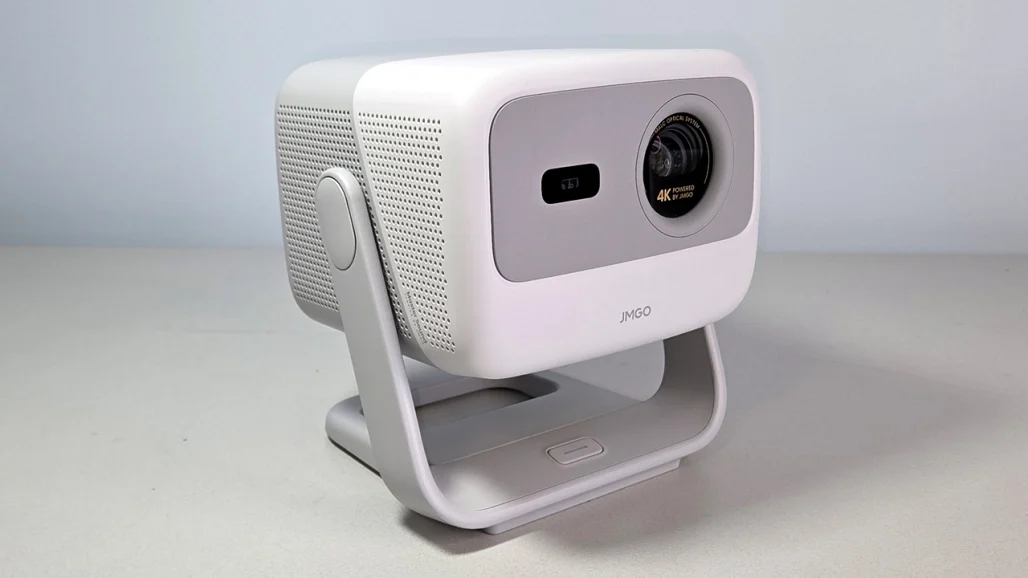
JMGO N1S 4K stands out as one of the most compact and affordable true-4K options on the market. Weighing under 5 pounds with a triple-laser light engine, gimbal stand, Google TV, native Netflix, and up to 200-inch projection, it delivers cinema-like visuals from a device small enough to carry room-to-room or even outdoors.
JMGO N1S 4K’s key specs, real-world performance, setup, pros/cons, pricing, how-tos for key features, comparison tables, tips for global users. N1S 4K is a compelling choice for home theater enthusiasts seeking big-screen 4K without a bulky setup.
Key Specs & Design
The JMGO N1S 4K uses a triple-laser RGB light engine (MALC 2.0) for vibrant colors (110% BT.2020 gamut coverage, 1.07 billion colors) and 1100 ISO lumens brightness. It employs pixel-shifting DLP technology to achieve 4K UHD (3840×2160) resolution from a 1080p chip, delivering sharp details up to 200 inches.
The standout design is its integrated gimbal stand—rotate 360° horizontally and tilt 135° vertically for flexible placement without readjusting keystone or focus. Auto-keystone, auto-focus, and screen-fit happen in seconds via sensors. Google TV OS includes native Netflix, Chromecast, Wi-Fi 6, Bluetooth 5.1, two HDMI 2.1 ports (one eARC), USB-A, and 10W Dolby Audio speakers.
JMGO N1S 4K Specs Table
| Specification | Details |
|---|---|
| Resolution | 4K UHD (pixel-shifted) |
| Light Source | Triple RGB laser (MALC 2.0) |
| Brightness | 1100 ISO lumens |
| Contrast Ratio | ~1600:1 FOFO (dynamic higher) |
| Color Gamut | 110% BT.2020, 151% DCI-P3 |
| Projection Size | 40–200 inches |
| Throw Ratio | ~1.2:1 (standard) |
| OS | Google TV (Netflix certified) |
| Audio | 2×5W Dolby Audio |
| Connectivity | 2× HDMI 2.1 (1 eARC), USB-A, Wi-Fi 6, BT 5.1 |
| Dimensions & Weight | Compact (~4.4 lbs) |
| Price (2026 street) | $799–$999 (often discounted from $1,299) |
Image Quality & Performance
Reviews highlight excellent value for a compact 4K laser projector:
- Brightness — 1100 ISO lumens is sufficient for moderately lit rooms (100–120″ screen); handles ambient light better than many budget models.
- Color & Contrast — Triple laser delivers vivid, rainbow-free colors with good HDR10 support; Movie mode is decent out-of-box, though not perfectly accurate (calibration helps).
- Sharpness — Pixel-shifting provides crisp 4K details for movies, sports, and gaming.
- Gaming — Low input lag (~17ms), 240Hz refresh support, MEMC for smooth motion.
- Audio — Built-in speakers are clear with Dolby; pair Bluetooth headphones or soundbar via eARC for better immersion.
Limitations:
- Colors can look oversaturated without calibration.
- No Dolby Vision (HDR10 only).
- Fan noise is present but quieter than many competitors.
CNET calls it “a lot of 4K for a little”; PCMag praises portability and value.
How-To: Set Up & Use the JMGO N1S 4K
1. Initial Setup
- Place projector on flat surface or use gimbal stand.
- Plug in power → power on.
- Follow Google TV onboarding: connect Wi-Fi, sign in Google account.
- Netflix auto-activates (certified).
- Auto-keystone/focus activates on first use.
2. Adjust Projection
- Rotate gimbal for desired angle.
- Tap screen-fit or auto-setup in menu.
- Use remote or Google TV remote app for fine tweaks.
3. Optimize Picture
- Go to Settings → Picture → choose Movie mode.
- Adjust brightness/contrast via calibration tools.
- Enable HDR for compatible content.
4. Gaming Setup
- Connect console via HDMI 2.1.
- Enable Game mode in settings for low lag.
Tip for Bihar users: Use in dark rooms for best contrast; download content offline via Google TV apps.
Pros & Cons Table
| Pros | Cons |
|---|---|
| Extremely compact & lightweight | Colors need calibration |
| Affordable 4K laser | No Dolby Vision |
| Gimbal stand for easy setup | Limited to mobile app control |
| Google TV + native Netflix | Fan noise under load |
| Good brightness for size | Brightness lower than Ultra models |
Tips for JMGO N1S 4K in 2026
- Pair with a good screen or white wall.
- Use HDMI eARC for external audio.
- Update firmware via Google TV for fixes.
- For portability: Gimbal makes ceiling/rear projection easy.
- Low-light areas: Triple laser excels in mixed lighting.
FAQs: JMGO N1S 4K Projector 2026
1. Is the JMGO N1S 4K worth it in 2026?
Yes—for portable 4K under $1,000, it offers great value, sharpness, and convenience.
2. How bright is the JMGO N1S 4K?
1100 ISO lumens—good for 100–120″ in moderate light; darker rooms for best contrast.
3. Does it support Netflix natively?
Yes—Google TV certified with Netflix app built-in.
4. Can it be used outdoors?
Yes—portable design works well in controlled outdoor setups (evening/dark).
5. What’s the difference from N1S Ultra?
N1S 4K is smaller/cheaper (1100 lm); Ultra is brighter (2800+ lm), larger.
6. Is calibration needed?
Recommended for accurate colors; out-of-box is decent in Movie mode.
7. Any major downsides?
Limited HDR support, fan noise, colors oversaturated without tweaks.
Conclusion
The JMGO N1S 4K in 2026 delivers impressive 4K performance from a surprisingly small, portable package. With triple-laser color, gimbal flexibility, Google TV, and a sub-$1,000 price, it punches above its weight for room-to-room home theater or casual big-screen viewing.
If you want big, sharp 4K without a bulky setup, the JMGO N1S 4K is a strong contender. Check current deals on Amazon or JMGO’s site—grab one today and enjoy cinema-sized entertainment anywhere!
